Are issues deleted when you delete a user in Redmine? (impact and what to do)
Created on 2026-02-12
•

When you delete a user in Redmine, issues are not deleted. However, the name of the author or assignee disappears.
Objects that the deleted user created, such as issues, comments, attachments, and Wiki pages, are not deleted. They are kept. However, the author or updater of issues and other objects is shown as "Anonymous" instead of the name of the deleted user.
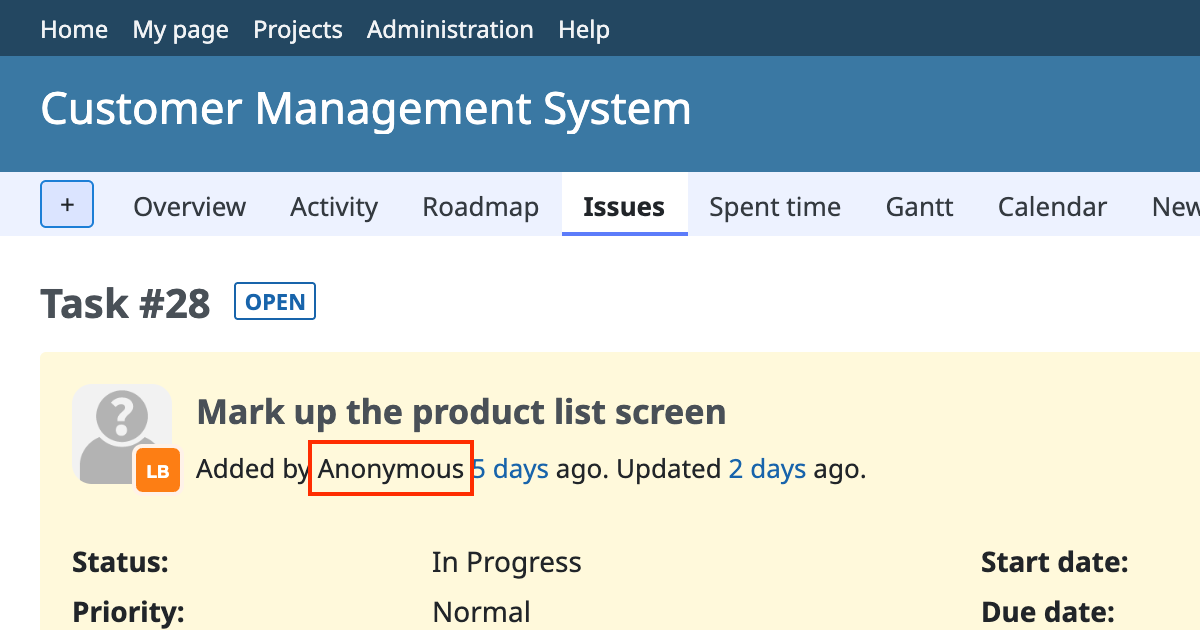
After you delete a user, the information about "who did what" is lost, and you cannot restore it. For this reason, when a user stops using Redmine because the user leaves the company or moves to another department, we recommend that you use the "Lock" feature instead of deleting the user.
Main effects of deleting a user
When you delete a user, the following happens.
- Data such as issues that the user created or updated, comments that the user wrote, attachments, and Wiki pages that the user created or updated remain.
- The name of the "author" and "updater" is replaced with "Anonymous". The Assignee of the issues that were assigned to the user becomes blank.
- After the name is replaced with "Anonymous", the link that shows that the original user created or updated the data is completely lost. You cannot restore the original state.
- You cannot restore a deleted user.
Recommended actions
1. Use "Lock" as the basic method
If you do not want the user to log in anymore, for example because the user leaves the company or the project, lock the user. The user cannot log in, but the name of the user remains in past issues and history.
You can lock a user from "Administration" → "Users" → "…" → "Lock".
2. Use "Delete" only in limited cases
Use the delete feature only in limited cases such as the following.
- You created a user by mistake, and the user has not yet done any activity such as creating an issue or adding a comment
- You want to remove dummy users that you created for testing
Comparison of "Delete" and "Lock"
| Item | Delete | Lock |
|---|---|---|
| Login | Not possible | Not possible |
| Name in past history | Becomes "Anonymous" | The name of the user is shown |
| Data restoration | Not possible | Restored when you unlock the user |
| Main use | Deleting an account that was created by mistake | Stopping the account of a user who left the company or moved to another department |
Reference information











