Redmine Monthly Digest — October 2026
2026-10-29
•
Tags: new-feature-before-release, 7.1, 7.0
•

Your monthly selection of useful Redmine resources and the latest news you need to know.
Contents
- Recommended Articles & Resources
- Redmine News & Development Updates
- My Redmine: Cloud-based Redmine Hosting Highlights
1. Recommended Articles & Resources
Redmine MCP + Cursor: list projects, read issues, update wiki
Source: RedmineShop
URL: https://redmineshop.com/blog/redmine-mcp-cursor
What if you could interact with Redmine directly from an AI-powered code editor?
This tutorial explains how to connect Cursor to a self-hosted Redmine instance using the Redmine MCP plugin. It walks through practical examples, including listing projects, searching issues, reading wiki pages, and updating wiki content.
The article also covers important security considerations, such as API key authentication, user permissions, and read-only access.
Free Redmine Plugins Worth Installing in 2026
Source: RedmineShop
URL: https://redmineshop.com/blog/free-redmine-plugins-2026
Looking for free plugins to extend Redmine's capabilities?
RedmineShop introduces six free plugins for self-hosted Redmine, covering features such as single sign-on, notifications, dashboards, checklists, reminders, and cloud attachments.
Beyond introducing these plugins, the article explains what to check before installing a Redmine plugin, including version compatibility, installation requirements, and security considerations.
The article also provides practical criteria for evaluating plugins before installation, which can help users select and install plugins safely.
Why documentation is so important (and how to do it right)
Source: Planio
URL: https://plan.io/blog/importance-of-documentation/
Good documentation helps teams share knowledge, maintain consistency, and avoid losing important information when members leave or change projects.
This article explores why documentation matters, the different types of documentation teams need, and practical ways to build an effective documentation system.
It also explains how project management tools and wikis can help teams organize and maintain shared knowledge.
How to Run Redmine 7.0 with Docker (Docker Compose / PostgreSQL)
Source: Redmine Advisor
URL: https://www.redmineadvisor.com/articles/7_0/redmine-7_0-docker/
Want to run Redmine 7.0 using Docker?
This step-by-step guide explains how to set up Redmine 7.0 with Docker Compose and PostgreSQL using the official Redmine Docker image. It covers essential configuration steps, including persistent data storage and secure management of sensitive information using Docker Secrets.
The guide also explains how to add Pandoc to enable document previews, a new feature in Redmine 7.0, and how to configure the background job queue adapter.
With practical configuration examples and commands, this article is a useful resource for anyone looking to set up Redmine 7.0 in a Docker environment.
2. Redmine News & Development Updates
Redmine 7.0.2 and 6.1.5 Released
URL: https://www.redmineadvisor.com/articles/7_0/redmine-7_0_2-released/
Redmine 7.0.2 and 6.1.5 have been released, bringing important security fixes and bug fixes.
Both releases address vulnerabilities involving unintended disclosure of private information through the REST API and a cross-site scripting (XSS) issue related to pasting HTML content from the clipboard.
Administrators are encouraged to review the release notes and consider upgrading their Redmine installations.
Preview of New Features in Pre-release Redmine!
I would like to introduce the new features that were committed to the official Redmine repository last month. Let's check out the new features that make Redmine even more useful.
This month, I'll highlight 6 issues out of the 62 issues committed in September 2026.
- Filter Project Members by Name, Role, and Status
- Separate Permissions for Exporting Issues and Time Entries
- Administration Page for All Webhooks
- Open Color for Syntax Highlighting
- Mention Highlighting Based on Viewing Permissions
- Group Selection in User Format Custom Fields
Filter Project Members by Name, Role, and Status
The "Members" tab under project "Settings" will allow members to be filtered by name, role, and status. Searches can include both user names and group names, making it easier to find members in projects with many users and groups.
For example, members with a specific role can be found without reviewing several pages of the member list. The status filter supports "Active" and "Locked" members. Filter settings are retained when moving between pages or adding, editing, or deleting members.
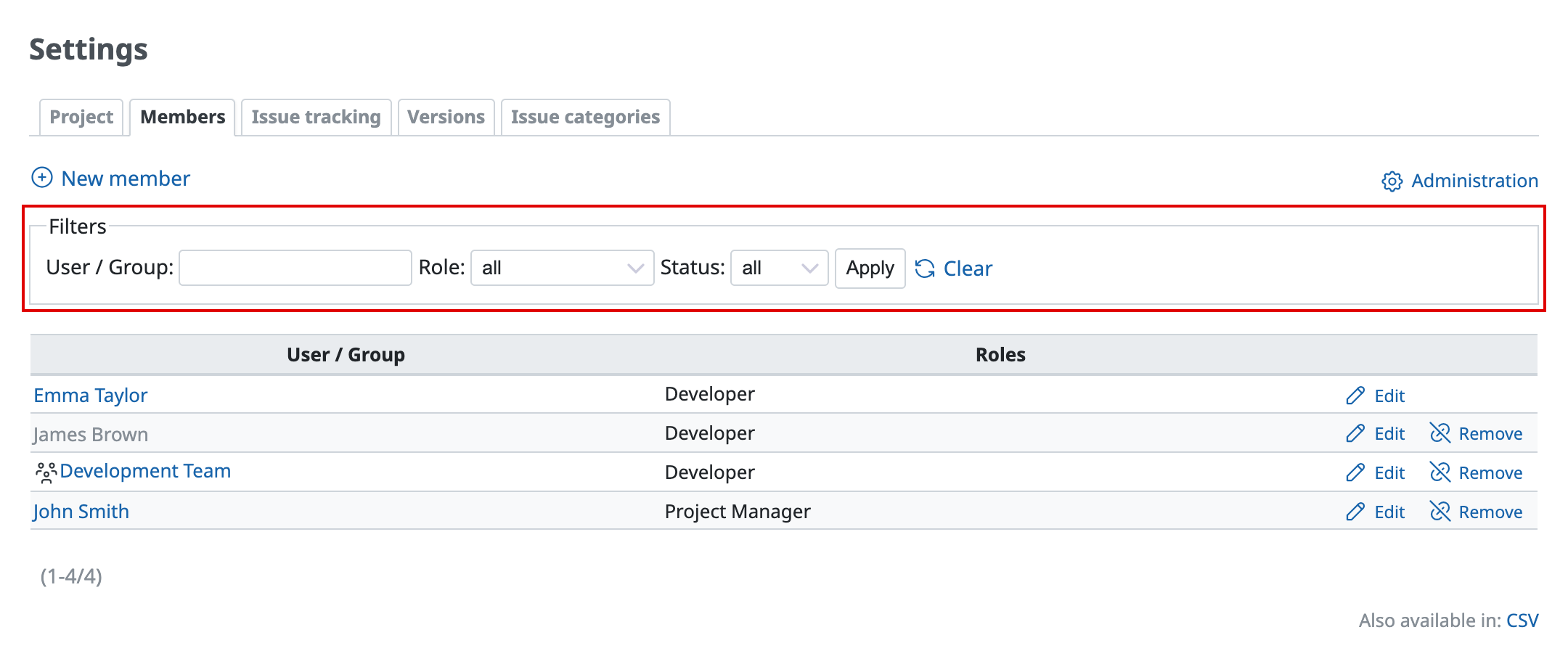
Filter project members by name, role, and status
- Implemented version: Redmine 7.1.0
- Official site issue: Feature #44458: Filter project members by name, role and status in project settings
Separate Permissions for Exporting Issues and Time Entries
Two new permissions, "Export issues" and "Export time entries", will allow administrators to set export permissions separately from viewing permissions. Previously, users who could view issues or time entries could also export the data. The new permissions allow these actions to be controlled separately for each role.
The permissions cover the following exports:
| Permission | Exports covered |
|---|---|
| Export issues | Issue lists in CSV and PDF; individual issues in PDF; Gantt charts in PDF and PNG; issue summaries in CSV |
| Export time entries | Time entry lists and time reports in CSV |
For lists that include data from multiple projects, users must have the relevant export permission in every project included in the export. These permissions do not apply to the REST API or Atom feeds.
When an existing installation is upgraded, roles with viewing permissions are given the corresponding export permissions to maintain the existing behavior. Administrators who wish to restrict exports should review role permissions after the upgrade.
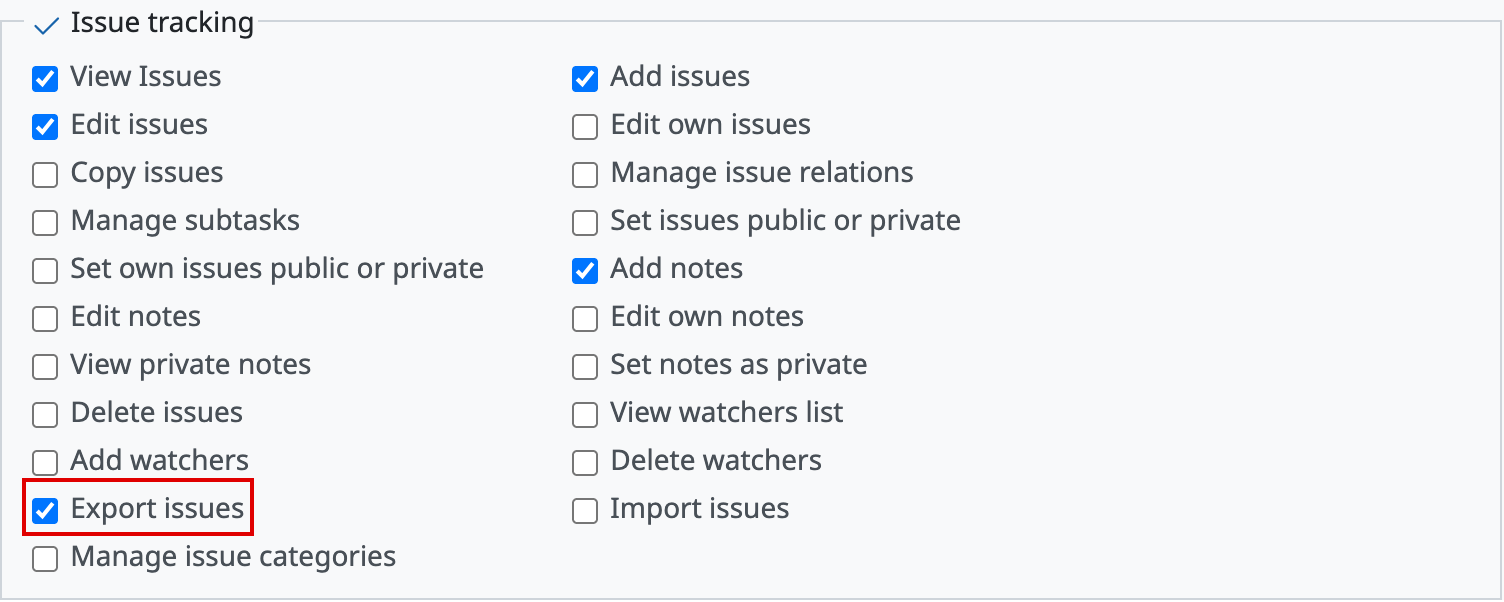
Issue export permissions can be set for each role

Time entry export permissions can be set separately from viewing permissions
- Implemented version: Redmine 7.1.0
- Official site issue: Feature #44424: Add "Export issues" and "Export time entries" permissions
Administration Page for All Webhooks
A new page under "Administration" lists all webhooks in the Redmine installation. Webhooks notify external services of events such as issue updates. Administrators can open this page by selecting "Administration" → "Webhooks".
Previously, only the user who created a webhook could view or edit it. Administrators therefore had no way to review all webhook settings. The new page lists all webhooks and the users who created them. It also allows administrators to edit, deactivate, or delete webhooks created by other users.
This page helps administrators check which external services receive project data and remove integrations that are no longer in use.
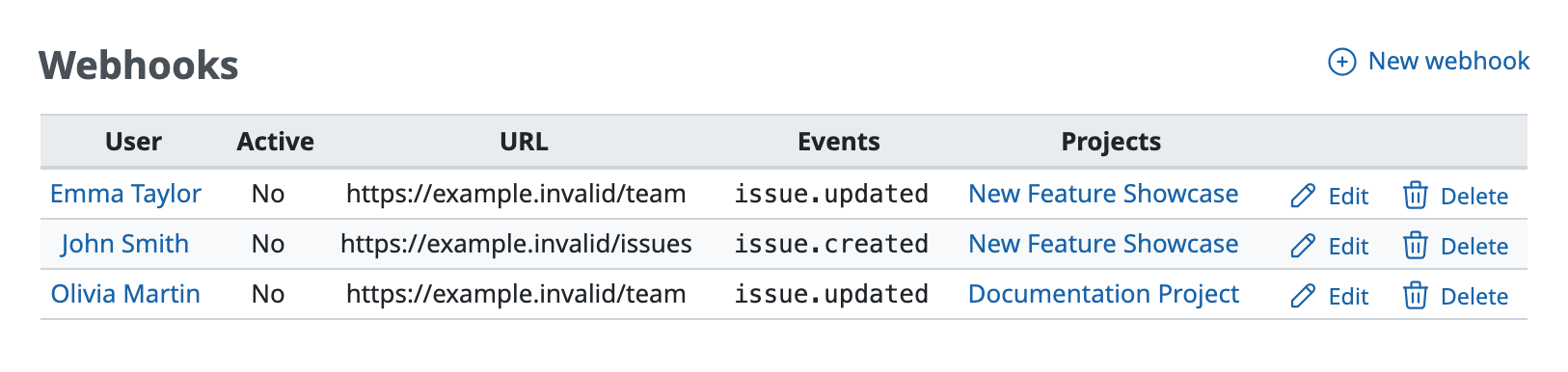
Administrators can view and manage webhooks created by other users
- Implemented version: Redmine 7.0.2
- Official site issue: Feature #44337: Add an administration page listing all webhooks
Open Color for Syntax Highlighting
Syntax highlighting will use Open Color, the color palette introduced in Redmine's default theme in version 7.0. Code blocks will therefore use the same palette as the rest of the interface.
The current colors will remain as similar as possible. Keywords will remain green, class names pink, and function names blue. Brown, previously used for elements such as Ruby symbols, will change to orange. Similar shades will also be combined, reducing the number of colors from 44 to 22.
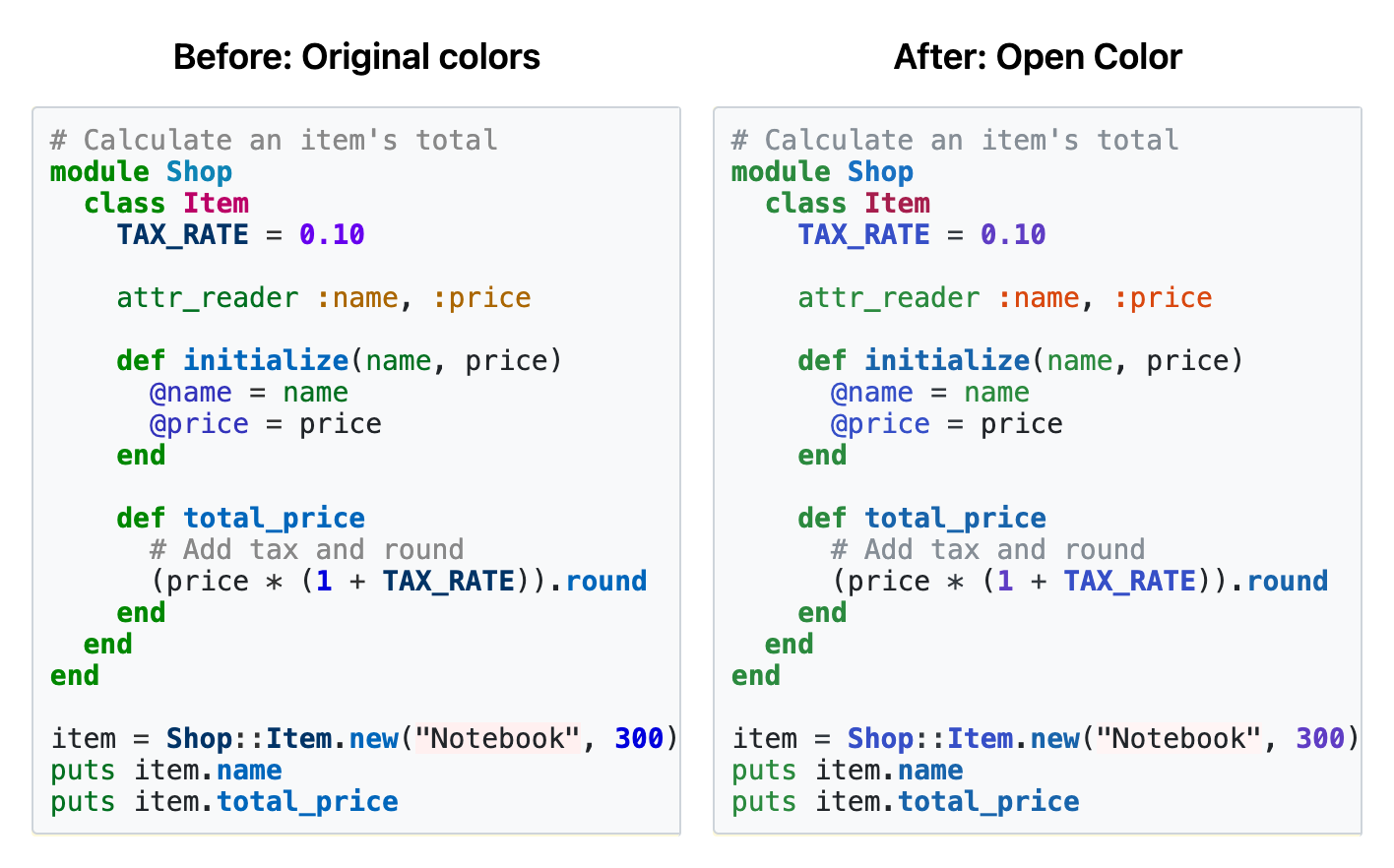
Left: previous colors / Right: Open Color palette
- Implemented version: Redmine 7.1.0
- Official site issue: Feature #44521: Extend Open Color to syntax highlighting
Mention Highlighting Based on Viewing Permissions
The appearance of mentions will indicate whether the mentioned user has permission to view the issue or other content. Previously, all mentions had the same appearance, including mentions of users who lacked access and could not receive a mention notification.
Mentions of users with viewing access will have a light blue background. Mentions of the user who is currently signed in will have an orange background. Mentions of users without viewing access will appear as standard links with no background color. These differences will make it easier to identify users who cannot view the issue and will not receive a mention notification.

Mention highlighting reflects viewing permissions and the signed-in user
- Implemented version: Redmine 7.1.0
- Official site issue: Feature #39528: Change mention link color for users without access to view issues
Group Selection in User Format Custom Fields
Custom fields with the "User" format will allow groups to be selected in addition to individual users. A new "Possible values" setting will provide three options:
| Setting | Selectable values |
|---|---|
| Users | Users who are members of the project (default) |
| Users and groups | Users and groups that are members of the project |
| Groups | Groups that are members of the project |
For example, a field named "Reviewer" or "Responsible team" will allow a team to be specified as well as an individual. Filtering possible values by role will also apply to groups. In issue filters, selecting << me >> will also include groups to which the current user belongs.
Existing custom fields will retain the default "Users" setting and continue to work as before.
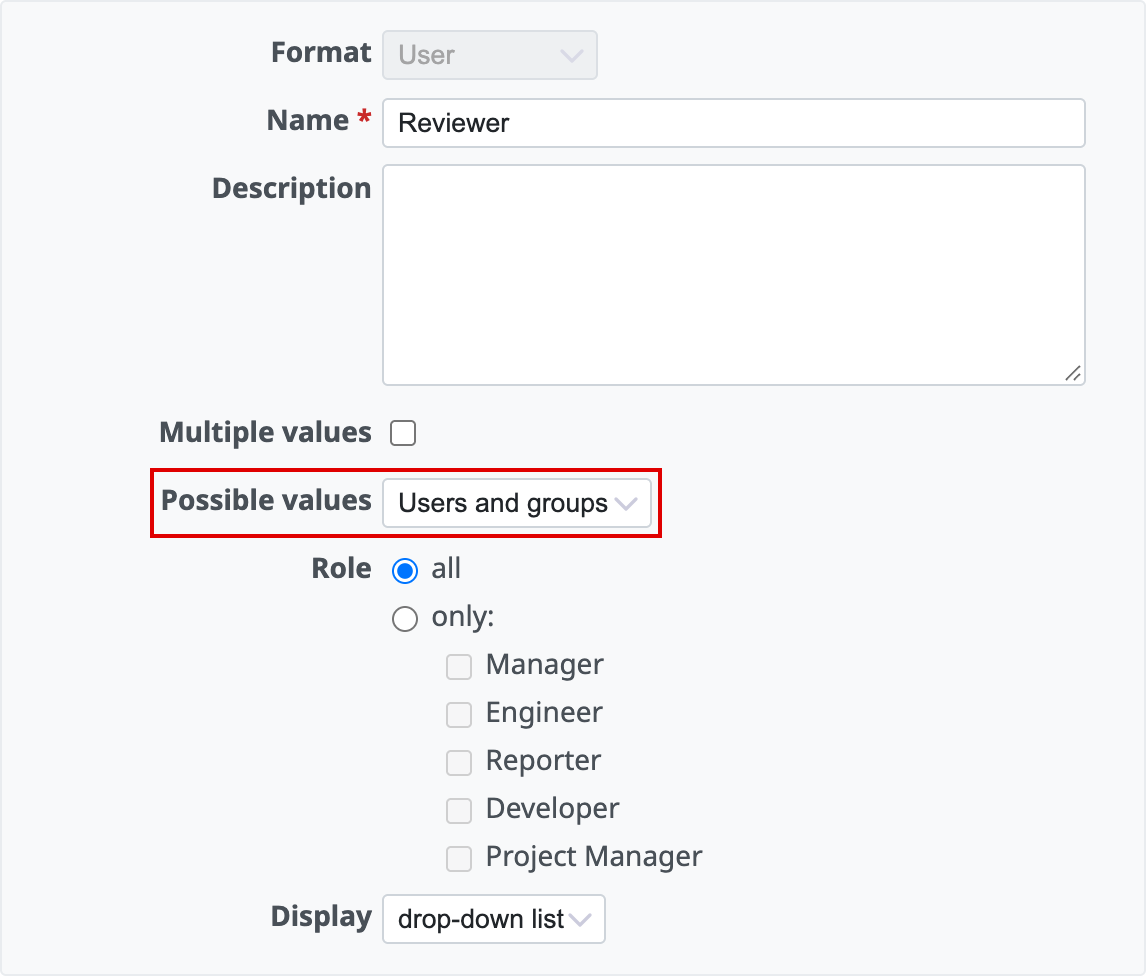
Possible values can include users, groups, or both
- Implemented version: Redmine 7.1.0
- Official site issue: Feature #21026: Allow selecting groups in user format custom fields
3. My Redmine: Cloud-based Redmine Hosting Highlights
GitHub Integration Now Available for My Redmine Global Edition
URL: https://www.redminecloud.net/whats-new/2026/07/github-integration-news/
My Redmine Global Edition introduced GitHub integration on July 16, 2026, making it easier to manage source code in GitHub while tracking development tasks in Redmine.
Powered by the GitHub Webhook Adapter plugin, this feature automatically links GitHub commits to Redmine issues.
By including an issue number in a commit message, developers can associate code changes with the corresponding issue. Commit messages can also be used to update issue status and log working time.
The integration helps development teams track the relationship between source code changes and project tasks without switching between tools.
GitHub integration is available on all My Redmine Global Edition plans at no additional cost. It supports repositories hosted on GitHub.com.