Redmine 7.0 New Features: 35 Key Changes with Screenshots
2026-07-09
•
Tags: 7.0
•


Redmine 7.0, the open source project management software, was released on June 30, 2026, with 122 changes and fixes.
This article highlights 35 of the most useful changes and explains them with screenshots and practical examples.
Table of contents
- Accounts / authentication
- Attachments
- In-browser PDF Preview Recommended
- In-browser Preview for Office and LibreOffice Documents Recommended
- Support AVIF Image Format
- Email notifications
- Gantt
- Groups
- Issues
- Issues filter
- Issues list
- I18n
- Name Field Order Follows Display Settings Recommended
- Projects
- Project settings
- REST API
- Text formatting
- UI
- Introduce Open Color to Unify and Standardize CSS Colors Recommended
- Simplify Fieldset Borders in Issue Edit Form
- Declare Text Direction on HTML Element for Better RTL/LTR Styling Support
- UI Improvements for a Simpler Design (Borders and Padding)
- Improved Layout Spacing
- New Default Gravatar Option "Color"
- Integrating rtl.css into application.css using CSS Logical Properties
- Replacing Physical CSS Properties with Logical Properties in Core CSS Recommended
- Change "Delete" to "Remove" for Non-destructive Actions Recommended
- File-type Icons in Attachment Lists
- Redesigned Header with a Navigation Bar Recommended
- Webhooks
- Standard Webhooks Support Recommended
- Wiki
- Export All Wiki Pages as a ZIP Archive Recommended
What is Redmine?
Redmine is an open source project management software. It can be freely installed on self-hosted servers or used via cloud services. For more information about Redmine, visit official site.
Accounts / authentication
Sudo Mode Enabled by Default
The "sudo mode" feature, which prompts users to re-enter their password when performing critical security operations (such as accessing "Administration" -> "Settings"), has been enabled by default. This helps prevent security incidents where a third party might unauthorizedly alter configurations.
In previous versions, enabling sudo mode required configuring sudo_mode: true in the configuration file config/configuration.yml. Starting with Redmine 7.0, it is enabled by default, ensuring a secure environment even if administrators are unaware of this setting.
If you wish to disable this feature, you can do so by setting sudo_mode: false in the configuration file.
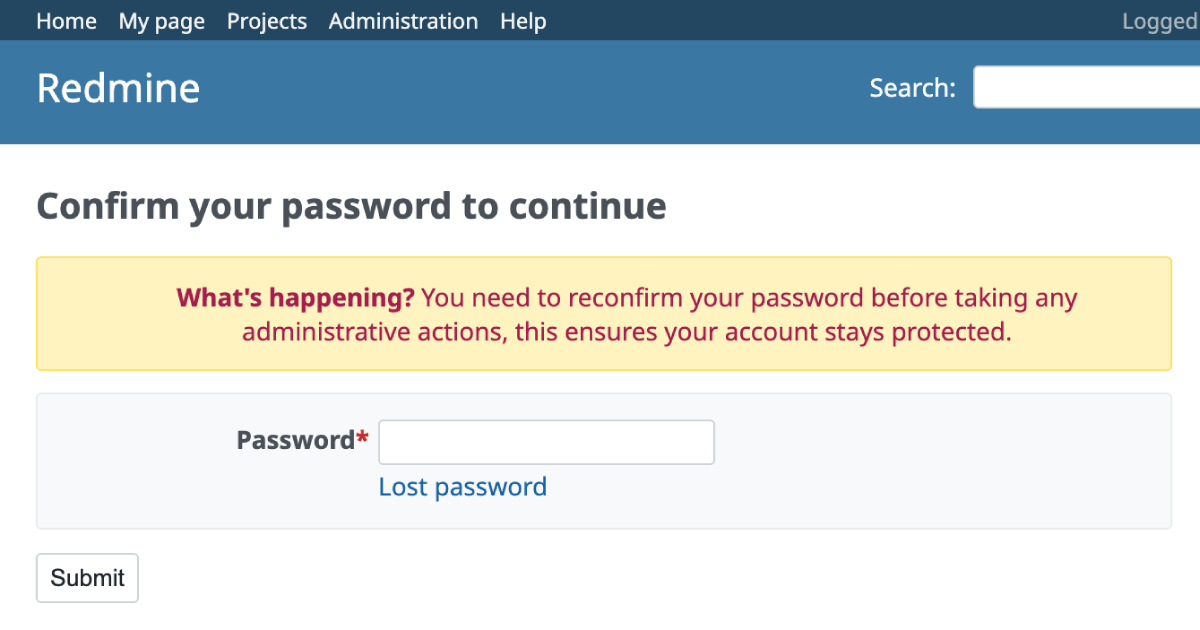
- Official site issue: Feature #44052: Enable sudo mode by default
Attachments
In-browser PDF Preview
Recommended
PDF attachments can now be viewed directly within the browser instead of being forced to download.
Clicking on a PDF file in the attachments list opens the browser's built-in PDF viewer. This significantly improves the user experience for quickly reviewing documents, as it eliminates the need to download files and open them in external applications.

before: Redmine 6.1
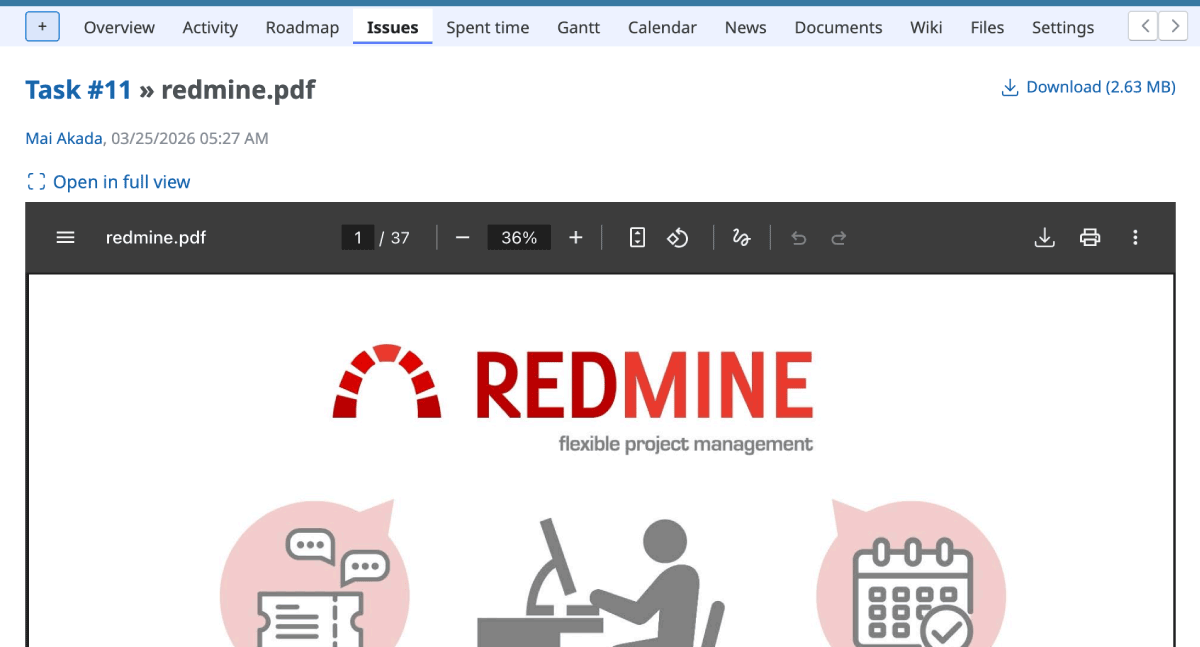
after: Redmine 7.0
- Official site issue: Feature #22483: Show PDF attachments and repo entries instead of downloading them
In-browser Preview for Office and LibreOffice Documents
Recommended
Microsoft Office files (.docx, .xlsx, .pptx) and LibreOffice files (.odt) attached to issues or other modules can now be previewed directly in the browser without downloading them.
This feature significantly improves productivity by allowing users to quickly check the content of attached documents without leaving the Redmine interface.
Example of a Word file
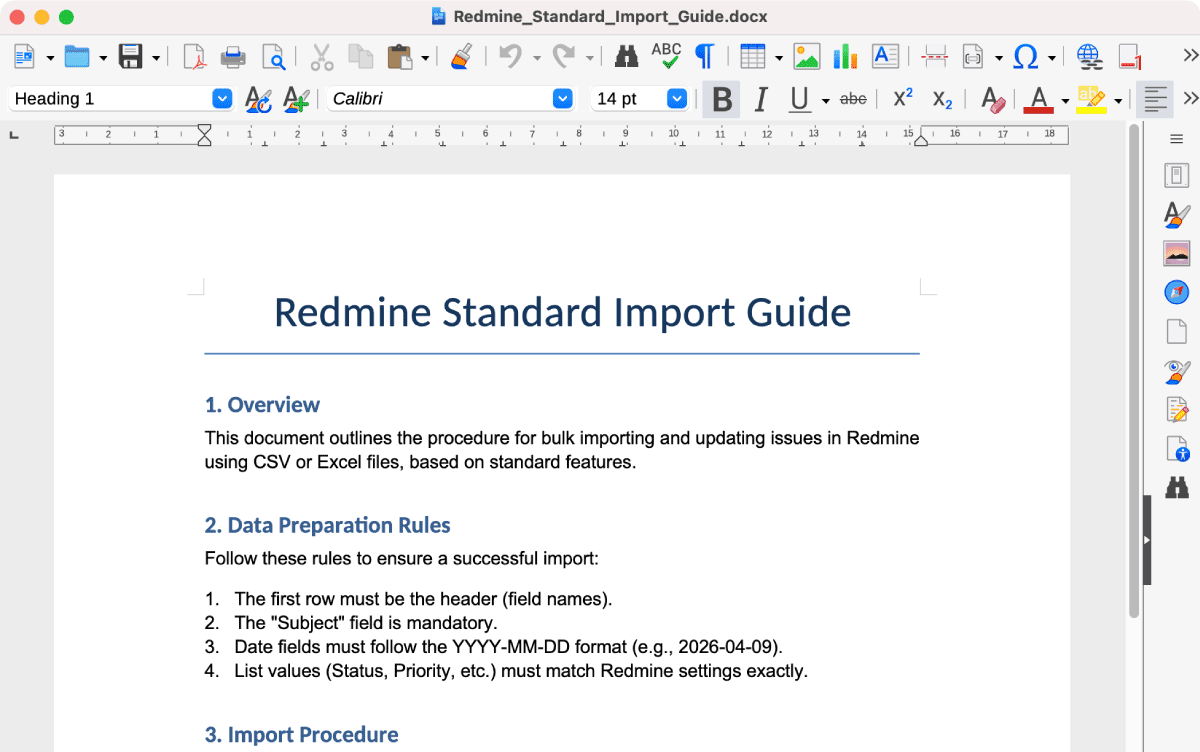
A Word file opened in LibreOffice
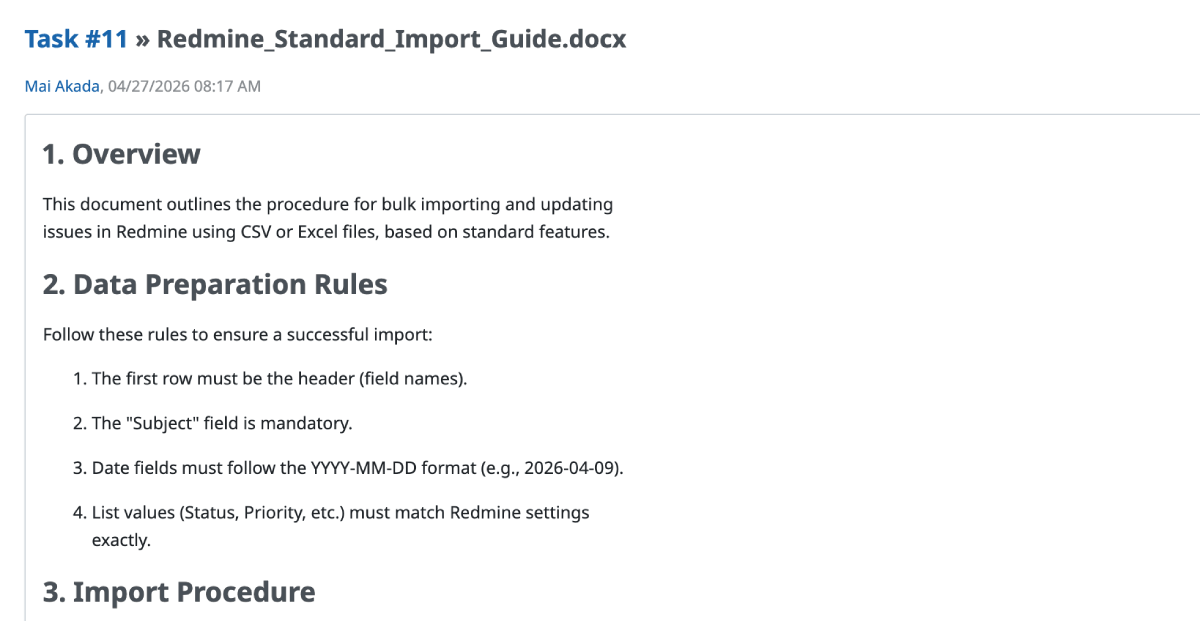
Preview of a Word file attached to a Redmine issue
Example of an Excel file
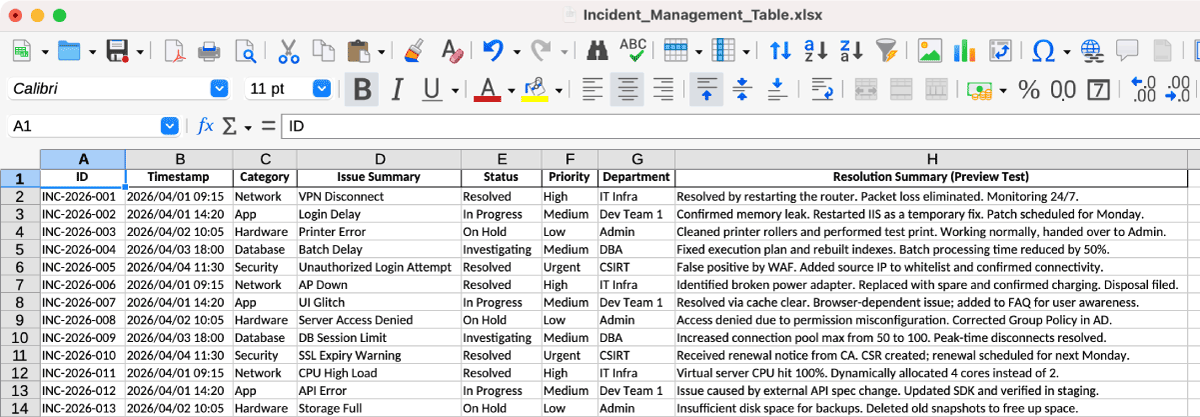
An Excel file opened in LibreOffice
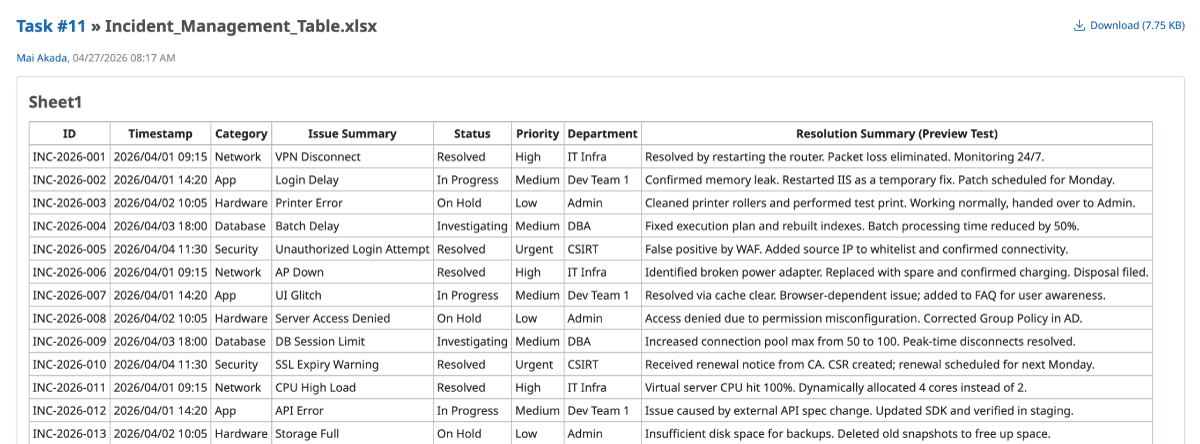
Preview of an Excel file attached to a Redmine issue
- Official site issue: Feature #8959: Preview support for Microsoft Office and LibreOffice Writer files
Support AVIF Image Format
The highly efficient, next-generation image format "AVIF" is now supported. AVIF images can be used for inline images and thumbnails within issues and Wikis. Since it significantly reduces file sizes while maintaining high image quality, it contributes to faster page load times.

- Official site issue: Feature #43943: Support AVIF image format
Email notifications
Auto-watch for Issues Assigned to Me
A new feature has been added that automatically adds you as a watcher when an issue's assignee is changed to you.
The existing auto-watch settings, such as "Issues I created" or "Issues I contributed to," require you to manually create or update an issue. However, this new feature works even when another user assigns you to an issue.
As soon as you are assigned, you are automatically added as a watcher. This ensures you receive notifications for any comments or changes made even before you open the issue, preventing any information gaps. Furthermore, as a watcher, you can continue to track the progress of an issue until completion, even after the assignee has been changed to someone else.
How to Configure: Go to My account → Auto watch and check the box for "Issues assigned to me."

- Official site issue: Feature #2716: User option to automatically add assignee to watchers
"Only for things I watch" Added to Email Notification Settings
A new "Only for things I watch" option has been added to the email notification settings in My Account.
Previously, users would receive notifications for issues they were watching based on broader settings. With this new option, you can choose to receive notifications only for the issues you are explicitly watching, even if you are not the author or assignee. This makes it much easier to filter and manage the volume of notification emails.

- Official site issue: Feature #37978: Add a mail notification option for watched objects only
Gantt
Full Gantt Chart Support for RTL Environments
Previously, the Gantt chart was virtually unusable in RTL environments due to misaligned issue title hierarchies and missing chart segments (such as the following month). Redmine 7.0 has resolved these issues, ensuring that all data is rendered correctly. RTL users can finally utilize the Gantt chart as a practical tool for project management.
- Official site issue: Feature #43678: Improve Gantt chart behavior in RTL environments
Groups
Adding and Removing Multiple Users to Groups from the Users List
You can now add and remove multiple users to/from groups at once directly from the users list screen.
In previous versions, while you could add multiple users to a group from "Administration" -> "Groups" or project's "Settings" -> "Members" tab, removing users from a group required clicking the "Remove" link one by one.
With this improvement, you can select multiple users on the "Administration" -> "Users" screen and use the context menu to add or remove them. This also allows you to select multiple users and remove them from groups at once, improving efficiency.

- Official site issue: Patch #43640: Improve Group Controller – Enable Adding/Removing Multiple Users from Users View
Issues
Users and Groups Display Settings for Assignee Dropdown
Recommended
A new setting has been added to choose whether users or groups are displayed first in the assignee selection dropdown on issues.
In previous versions of Redmine, the display order was fixed to users first, then groups. In environments where groups are frequently assigned to issues, users had to scroll past a long list of individual users to reach the groups. This new feature allows you to change the order so you can select groups without scrolling, improving usability.
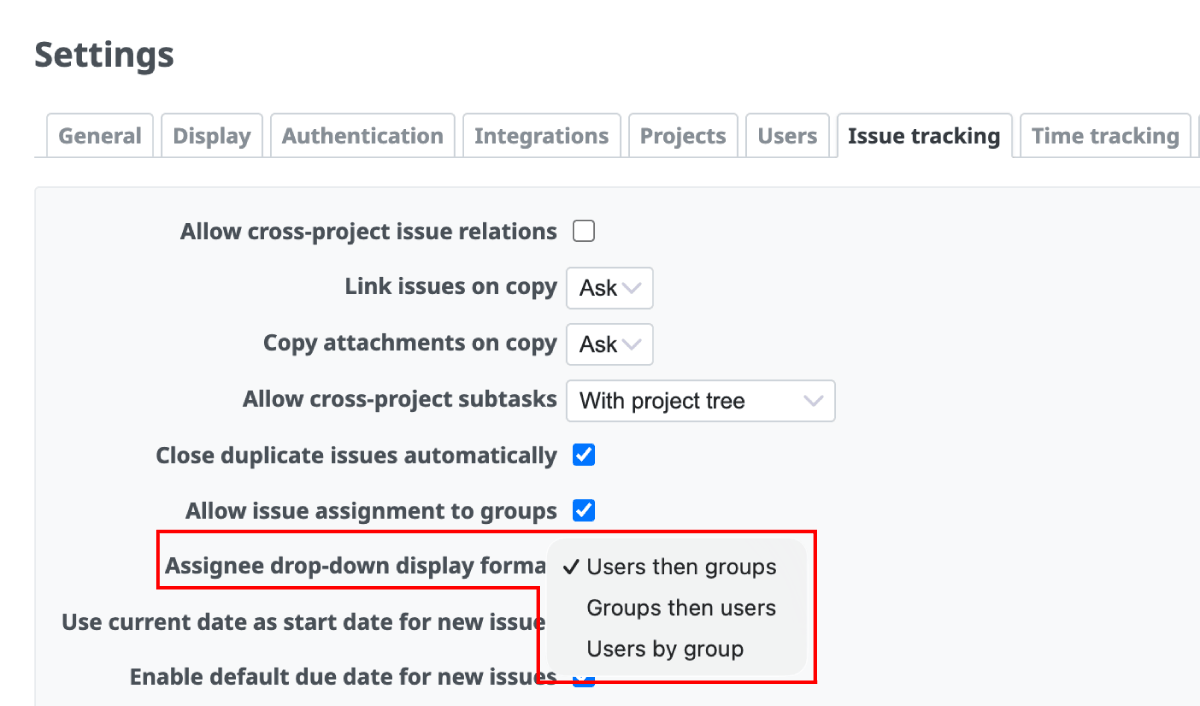
Administration -> Settings -> Issue tracking -> Assignee drop-down display format
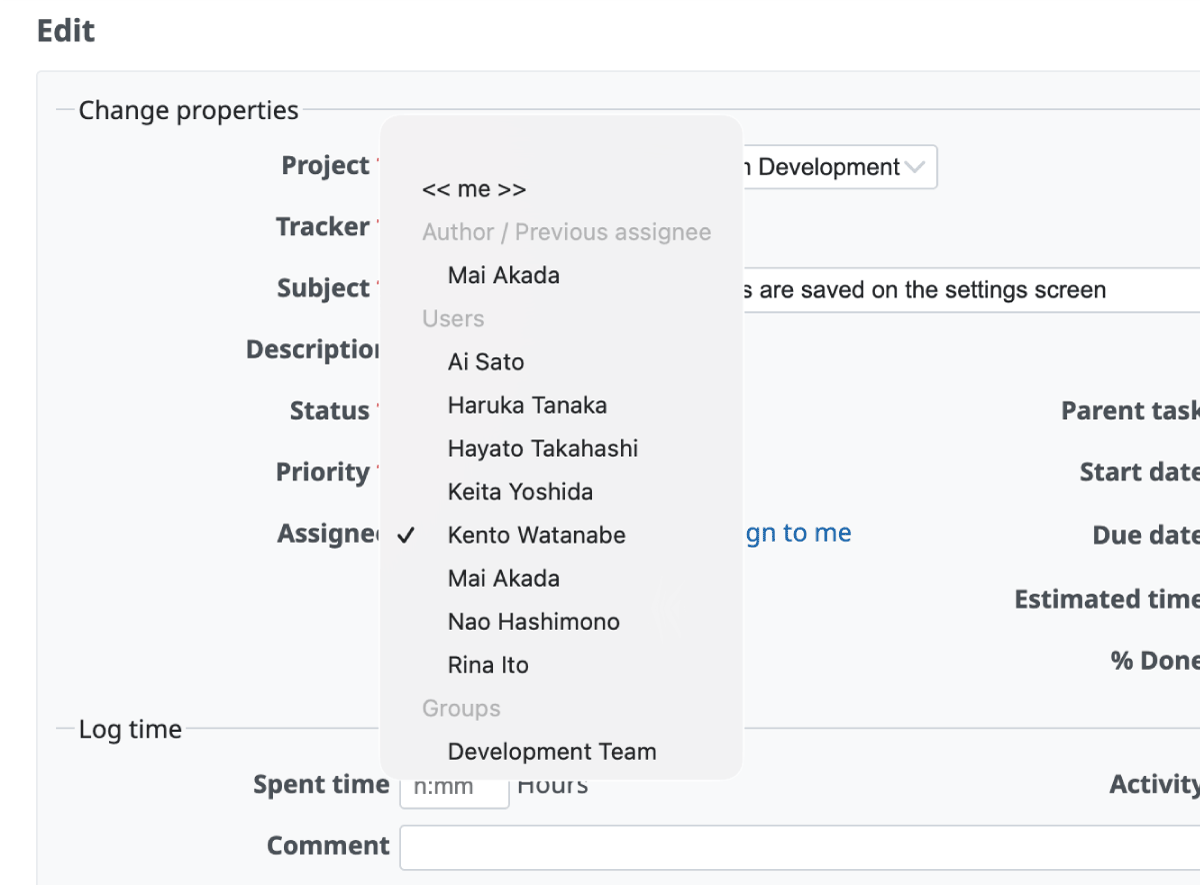
Users then groups
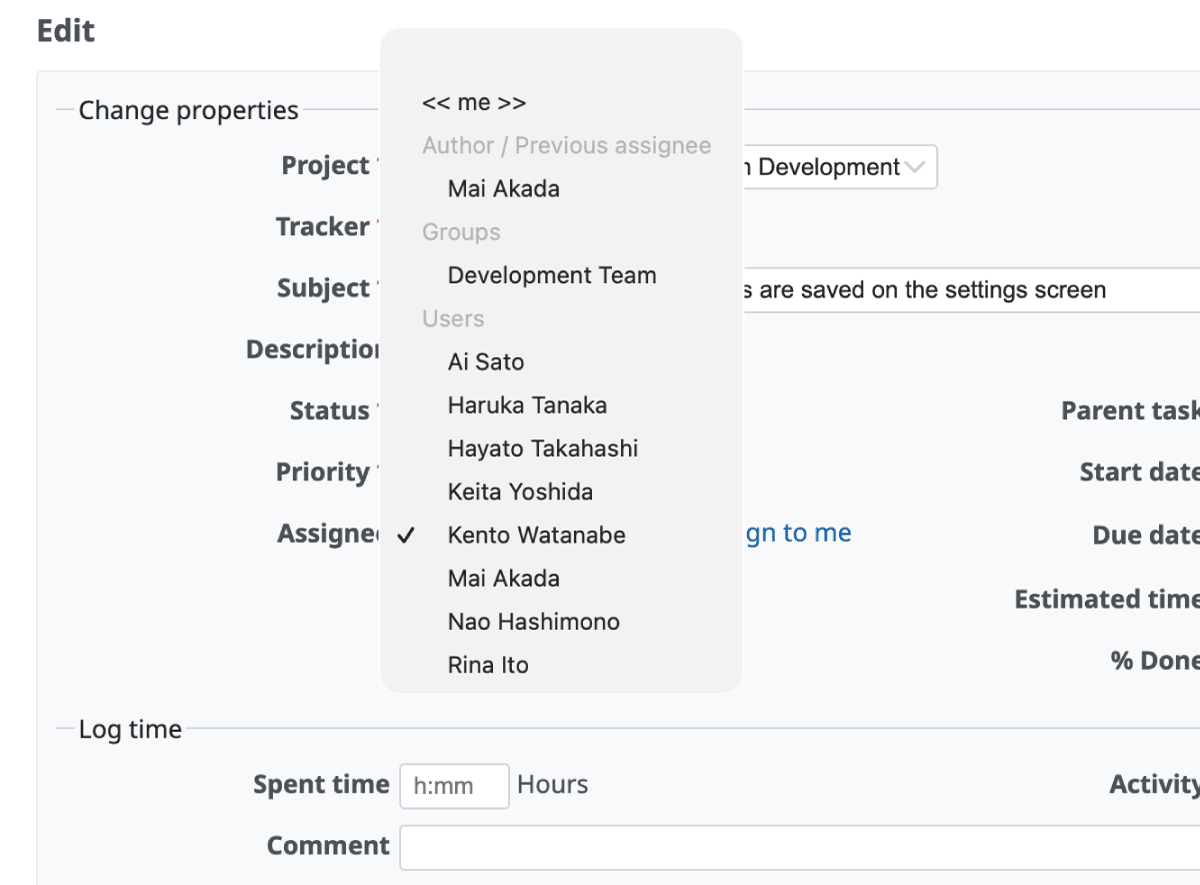
Groups then users
- Official site issue: Feature #43996: Add setting to choose users/groups order in assignee dropdown
"Users by Group" Display Option for Assignee Dropdown
Recommended
Additionally, you can now choose to group users by their group names in the assignee dropdown.
Administration -> Settings -> Issue tracking -> Assignee drop-down display format
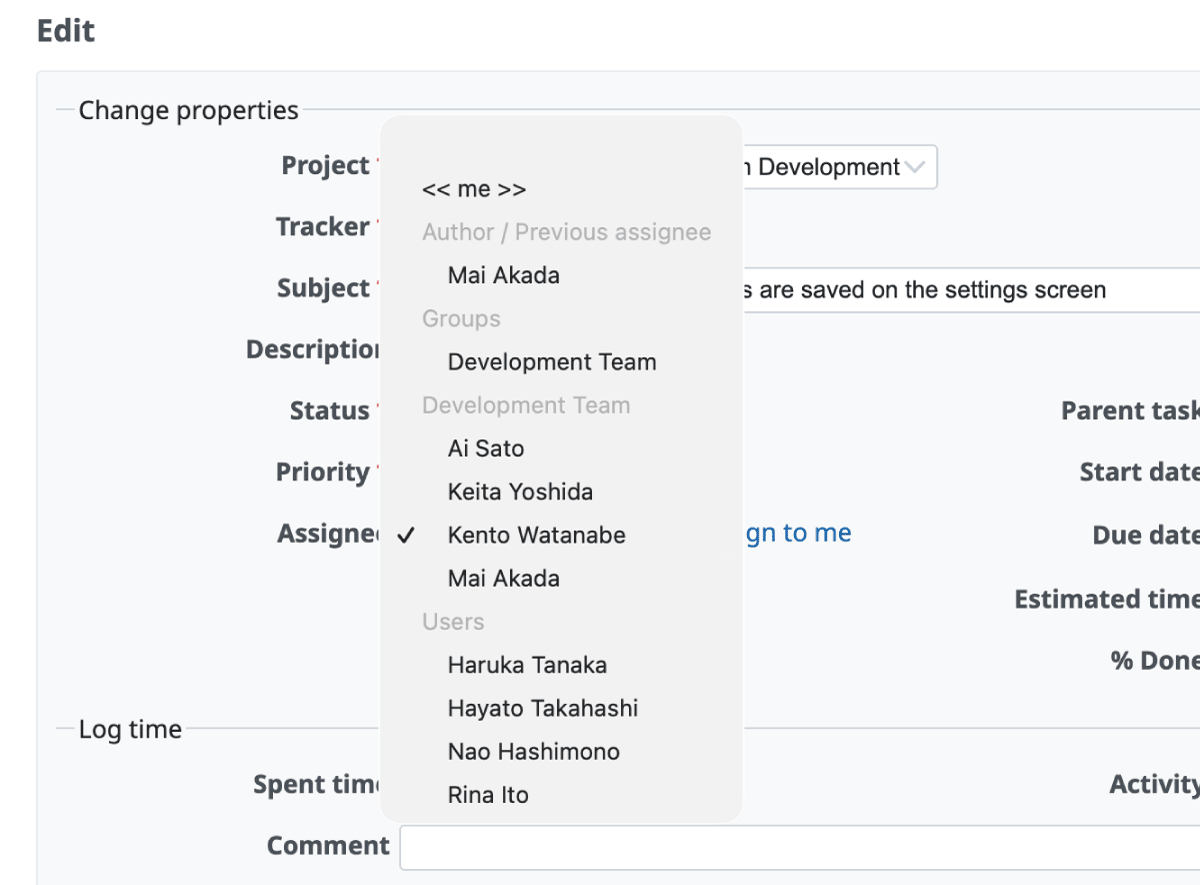
Users by group
- Official site issue: Feature #44015: "Users by group" display option for assignee drop-down
Default Due Date on New Issues with Configurable Offset
Recommended
A new option has been added to set a default due date of "N days after creation" when creating a new issue. This helps prevent forgetting to set due dates and ensures that email notification reminders work reliably.
For example, if you set it to "7", opening the new issue page on June 1st automatically sets June 8th as the due date. This feature is also supported for date-based custom fields (#44129).
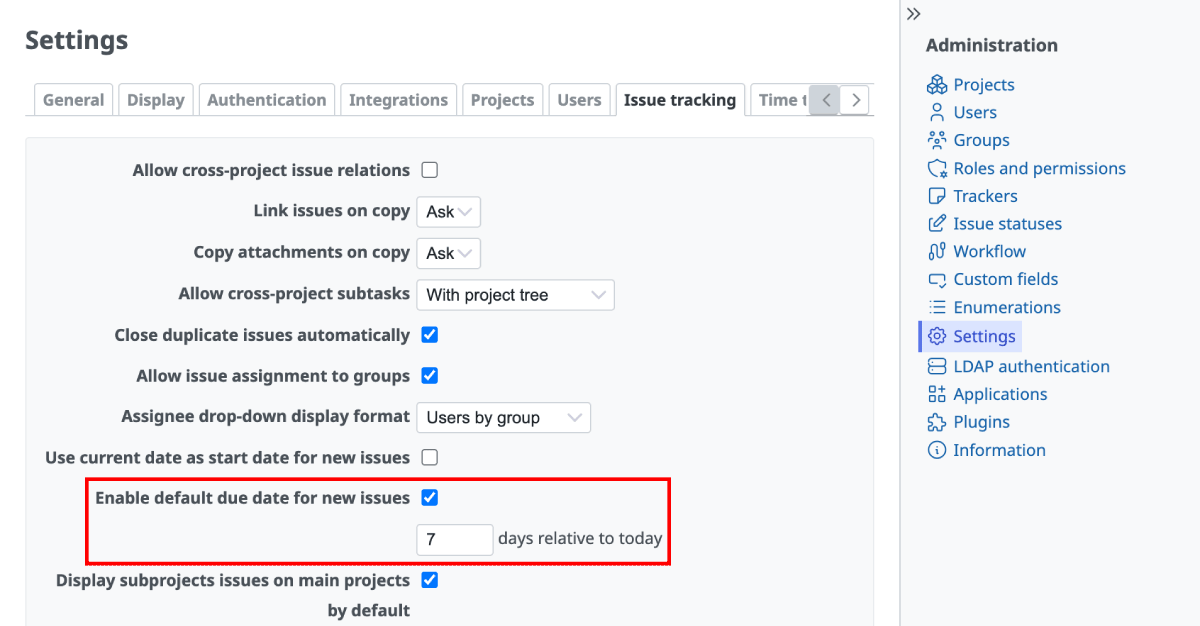
Administration -> Settings -> Issue tracking -> Enable default due date for new issues
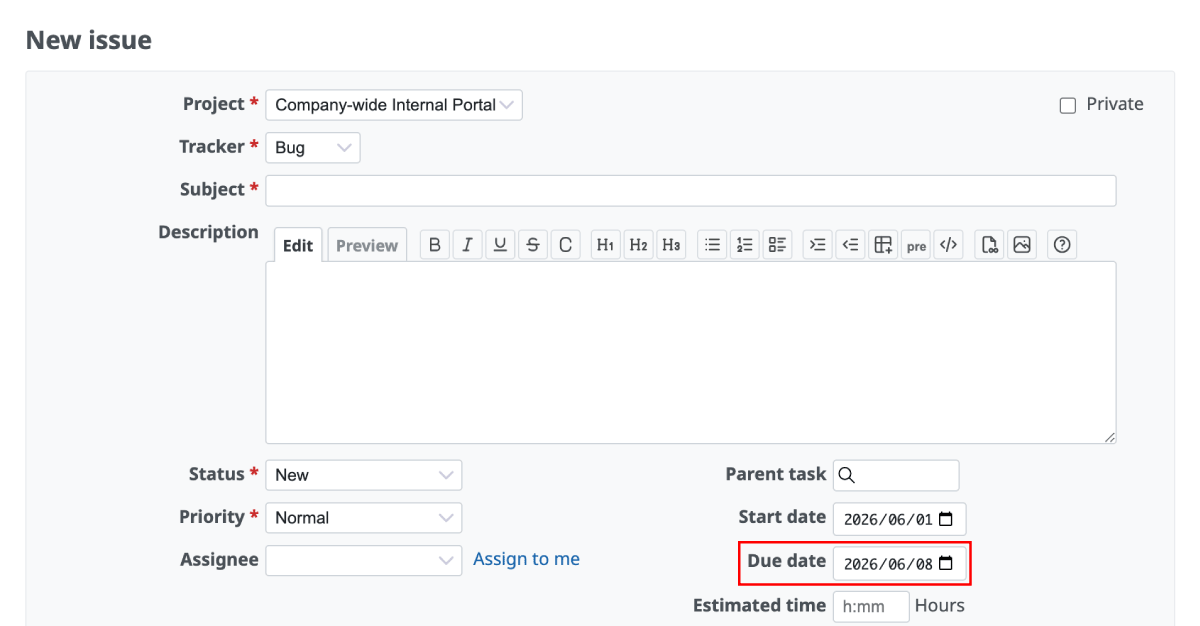
7 days after June 1st is June 8th
- Official site issue: Feature #31518: Default due date on new issues
Default Value for Private Issue Flag per Tracker
A new option, "Private by default" has been added to the tracker settings. When this option is enabled, the "Private" checkbox is pre-selected when creating a new issue using that tracker.
For projects where issues under specific trackers (e.g., "Internal Tasks" or "Security") should always be private, this option prevents information leakage caused by forgetting to check the private flag.


- Official site issue: Feature #9432: Default value for the private issue flag
Issues filter
Support for Time Format (e.g., "0:45") in Estimated Hours and Spent Time Filters
When specifying estimated hours or spent time in the issue list filter, you can now input time values directly in the HH:MM format, such as "0:45" or "1:30".
In previous versions, even if the display settings were configured to show time format, users had to input hours in decimal format (e.g., "0.75" for 45 minutes, "1.5" for 1 hour 30 minutes) when filtering issues. This improvement aligns the filter input with the display format, making searching for issues by estimated hours or spent time more intuitive and effortless.
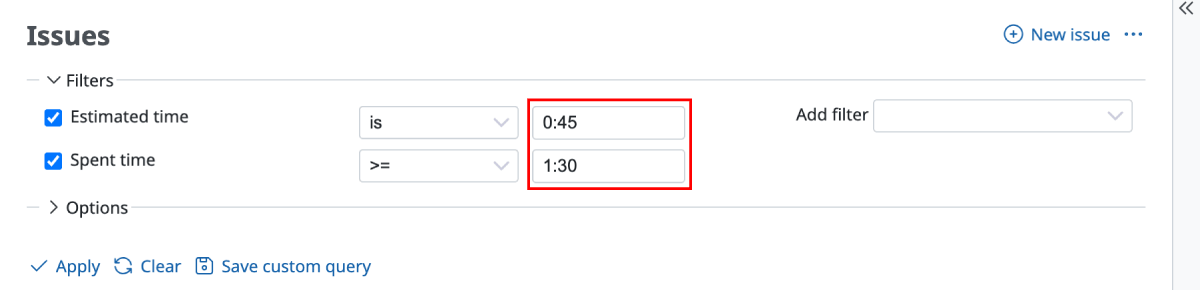
Redmine 7.0
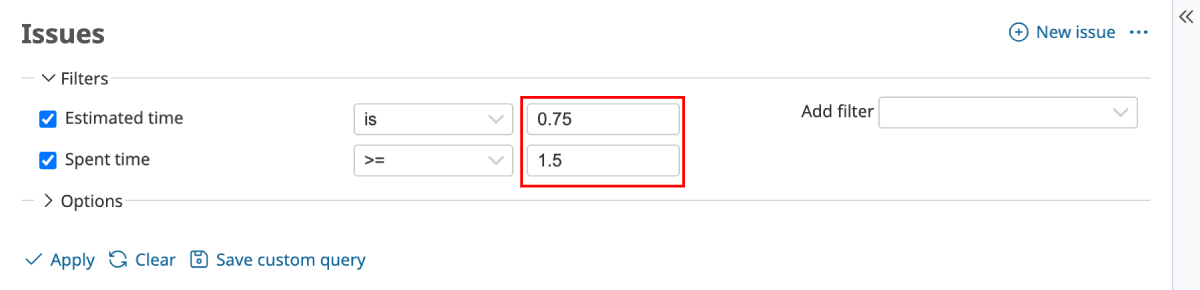
Redmine 6.1
- Official site issue: Feature #43968: Allow 0:45h time span format input in the estimatedhours and spenttime filter of IssueQuery
Issues list
Right-Aligned "Estimated Time" and "Spent Time" in Issue Lists
Numeric columns such as "Estimated time" and "Spent time" in the issue list—previously center-aligned—are now right-aligned. This makes it easier to compare numbers with different digit counts.
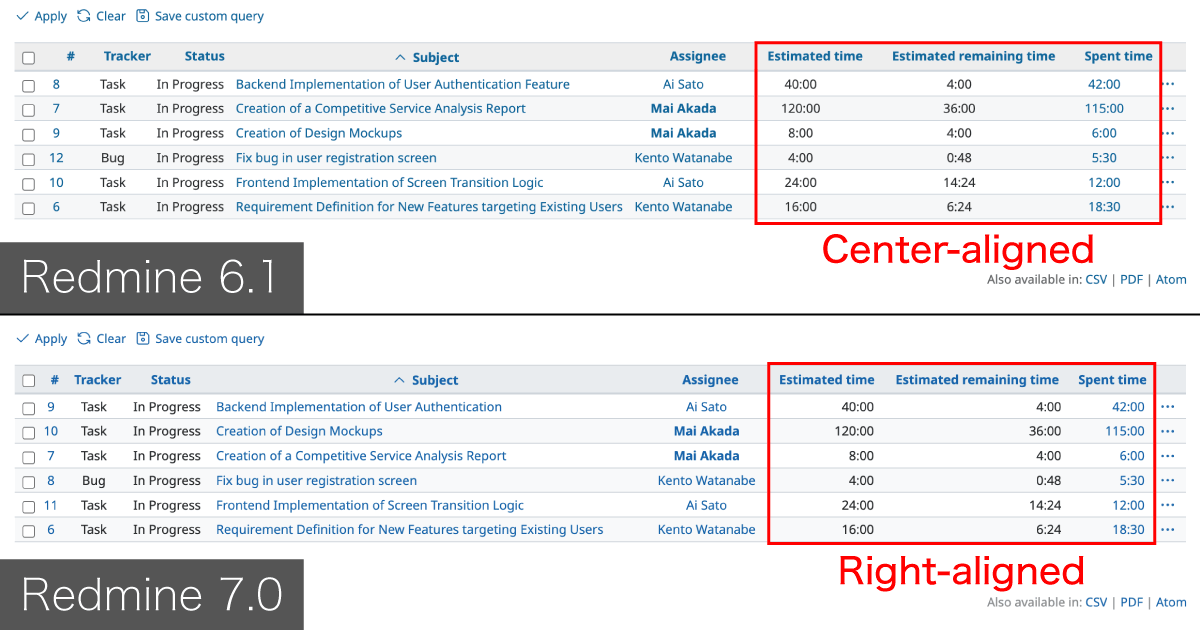
- Official site issue: Feature #43615: Right-align all time-tracking columns in Issues list
I18n
Name Field Order Follows Display Settings
Recommended
The order of "First Name" and "Last Name" input fields in user registration and profile forms now automatically adjusts to match the global "User display format" setting.
For example, if the system is configured to display names as "Last Name First Name" (common in certain regions like Asia), the input fields follow that same order. This provides a more localized data entry experience for users.


- Official site issue: Feature #4507: Make first and last name field order follow Users display format setting
Projects
"Closed Project" Warning on All Pages
The warning message indicating that a project is closed is now displayed on every page within that project.
Previously, the "This project is closed and read-only" warning was only visible on the project's Overview page. By displaying it globally across all sub-pages (such as Issues, Wiki, and Documents), Redmine ensures that users are always aware of the project's status, preventing confusion when they cannot edit or update information.


- Official site issue: Feature #43818: Show warning for closed projects on all project pages not only on Overview
CSV Export for Project Member Lists
The project member list (Project Settings → Members) can now be exported in CSV format.
This is particularly useful for auditing permissions or managing a large number of members. It allows administrators to easily extract the member list for reporting or further analysis in spreadsheet software.

- Official site issue: Feature #37480: CSV export of project memberships
Project settings
Links to Group Management from Project Settings > Members Tab
A direct link to the group editing/management screen ("Administration" -> "Groups" -> edit page of the specific group) has been added to the group names listed in the project's "Settings" -> "Members" tab.
Previously, when modifying member lists or changing configurations of a group that is registered as a project member, administrators had to leave the project settings, navigate to the "Administration" menu, and open "Groups". With this link, the workflow for project administrators is streamlined, making group maintenance much easier.

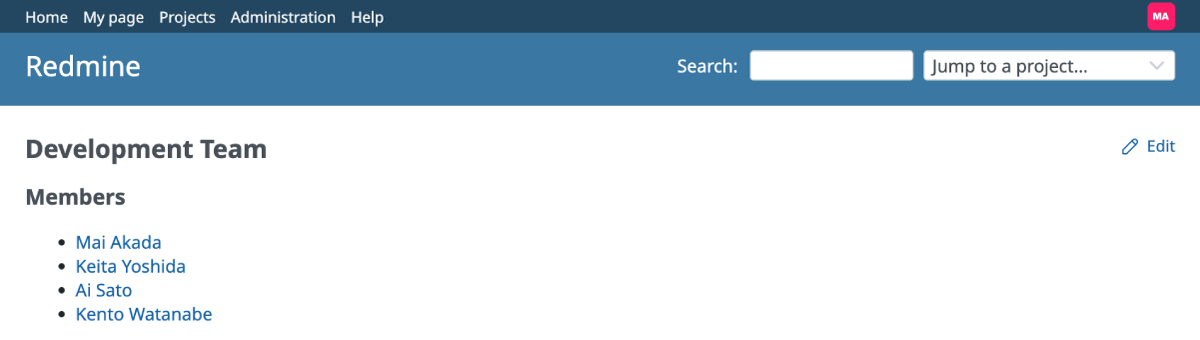
You can edit the group directly by clicking the "Edit" link at the top-right after clicking the group name.
- Official site issue: Feature #44013: Add links to groups in the project Settings > Members tab
REST API
API Now Includes Project ID and Name for Wiki Pages
When retrieving Wiki page info via the REST API, project details (ID and name) are now included in the response. This simplifies integration for developers connecting Redmine with external tools.
Redmine 7.0 - "project":{"id":1,"name":"Customer Management System Development"} is included.
$ curl -s -H "X-Redmine-API-Key: API-Key" "http://***/projects/Identifier/wiki/Development_Environment_Setup.json"
{"wiki_page":{"title":"Development_Environment_Setup","text":"# Development Environment Setup...","version":1,"author":{"id":5,"name":"Mai Akada"},"comments":"","project":{"id":1,"name":"Customer Management System Development"},"created_on":"2025-10-28T04:52:40Z","updated_on":"2025-10-28T04:52:40Z"}}%
Redmine 6.1 - "project":{"id":1,"name":"Customer Management System Development"} is not included.
$ curl -s -H "X-Redmine-API-Key: API-Key" "http://***/projects/Identifier/wiki/Development_Environment_Setup.json"
{"wiki_page":{"title":"Development_Environment_Setup","text":"# Development Environment Setup...","version":1,"author":{"id":5,"name":"Mai Akada"},"comments":"","created_on":"2026-01-27T08:49:53Z","updated_on":"2026-01-27T08:49:53Z"}}%
- Official site issue: Feature #43569: Adds project to wiki page API response
Track Last Usage of API and Atom Access Keys
Redmine now tracks when a user's API key and Atom access key were last used, and displays this information in the sidebar of the "My account" page. This makes it easier to verify if keys are still active, detect potential unauthorized access, and manage security or clean up unused keys.

- Official site issue: Feature #43938: Track last usage of API and Atom access keys
Text formatting
Support for CSS text-decoration Property
The CSS text-decoration property can now be used in text formatting for issue descriptions, Wiki pages, and more.
This allows for more flexible styling, such as strikethrough, underlines, or wavy lines, using standard CSS syntax within the supported text formatting.

- Official site issue: Feature #42444: Allow use of the CSS text-decoration property in text formatting
Pasting Spreadsheet Tables as Markdown/Textile Tables
Recommended
When you copy table data from spreadsheet software like Microsoft Excel and paste it into a Redmine text area, it is automatically converted to Markdown or Textile table syntax. This significantly reduces the manual effort of recreating tables in Redmine that were already created in external tools.
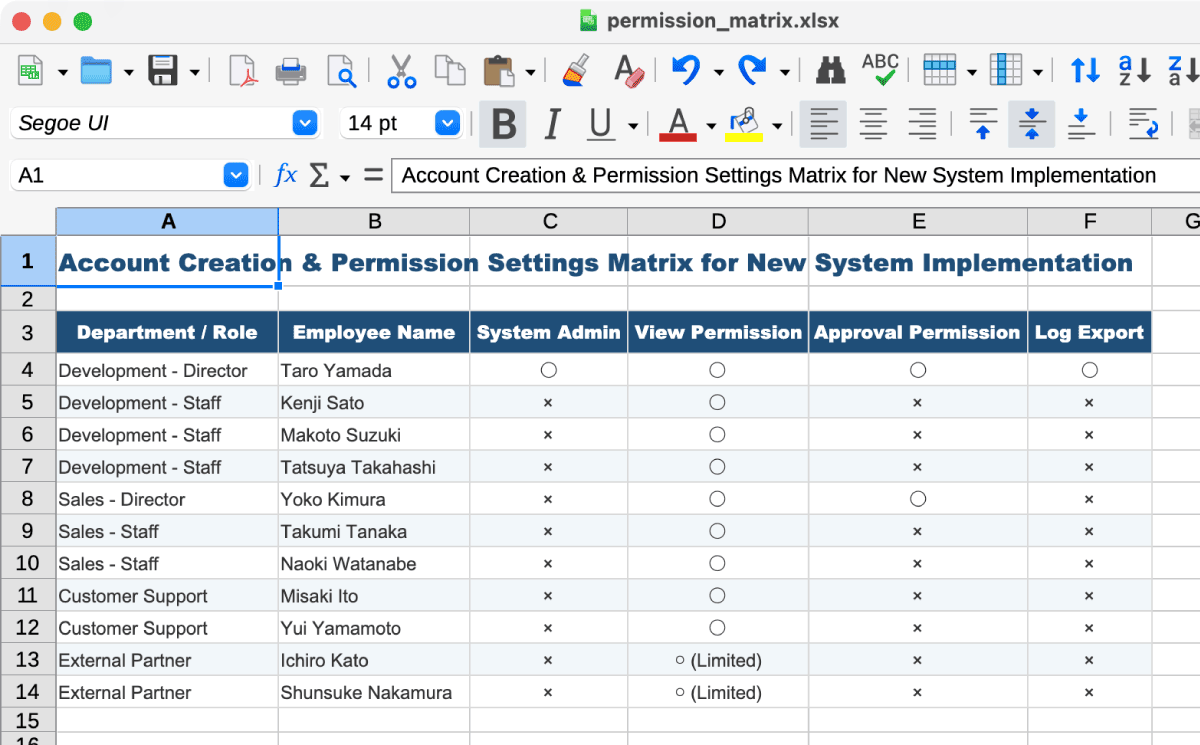
Spreadsheet data (source)
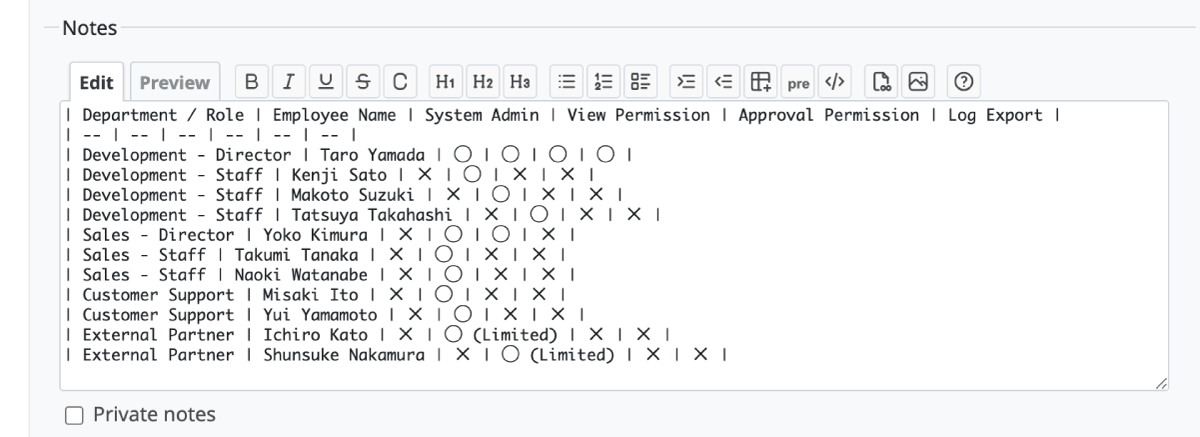
The edit screen after pasting into a Redmine issue
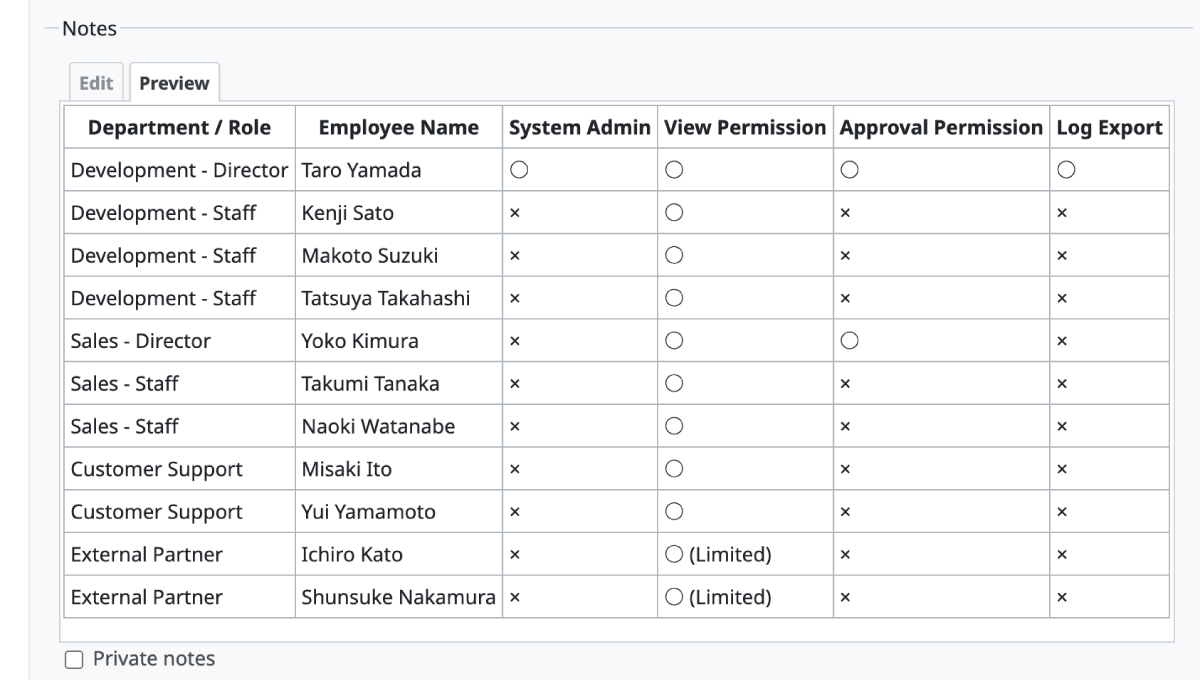
The preview screen of the pasted table
- Official site issue: Feature #43950: Add support for pasting spreadsheet tables as CommonMark/Textile tables in wiki textareas
UI
Introduce Open Color to Unify and Standardize CSS Colors
Recommended
The color palette used in the design has been unified under a standardized system called Open Color. This brings consistency and improved visibility to the color scheme of Redmine's buttons, links, backgrounds, etc., making the overall UI more cohesive and modern.
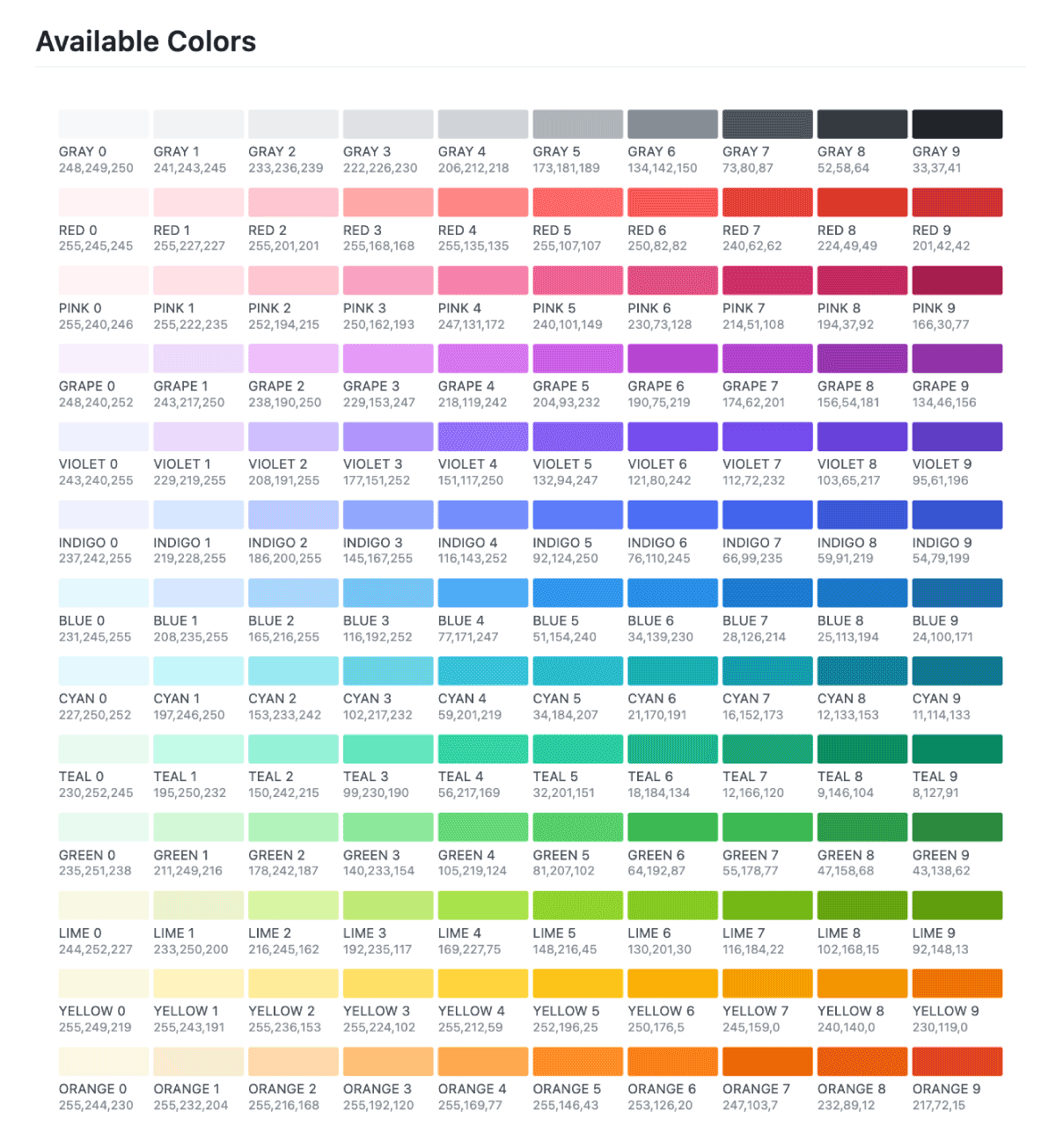
Color table of Open Color
Roadmap
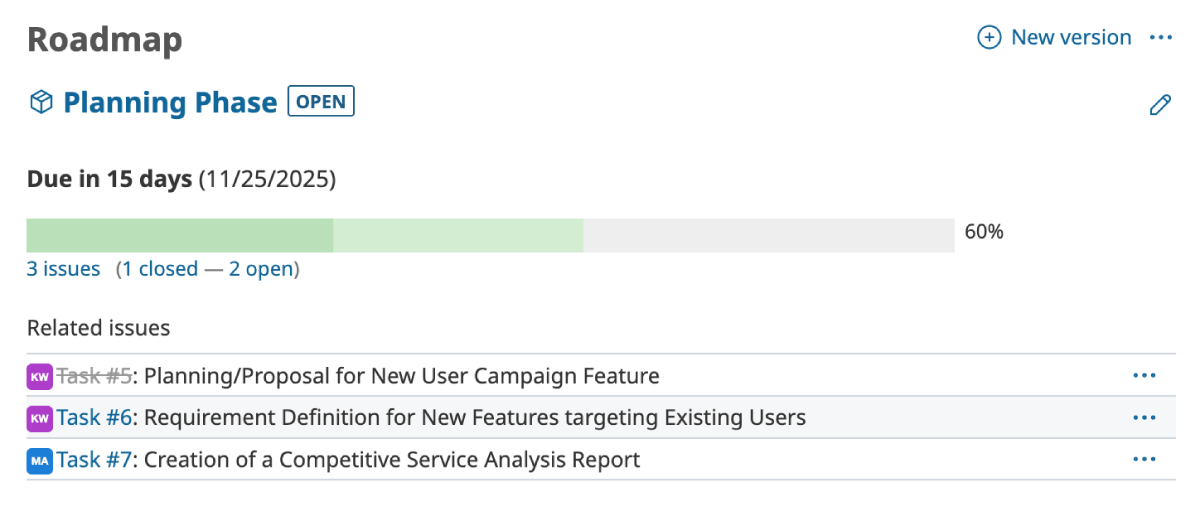
Redmine 6.1
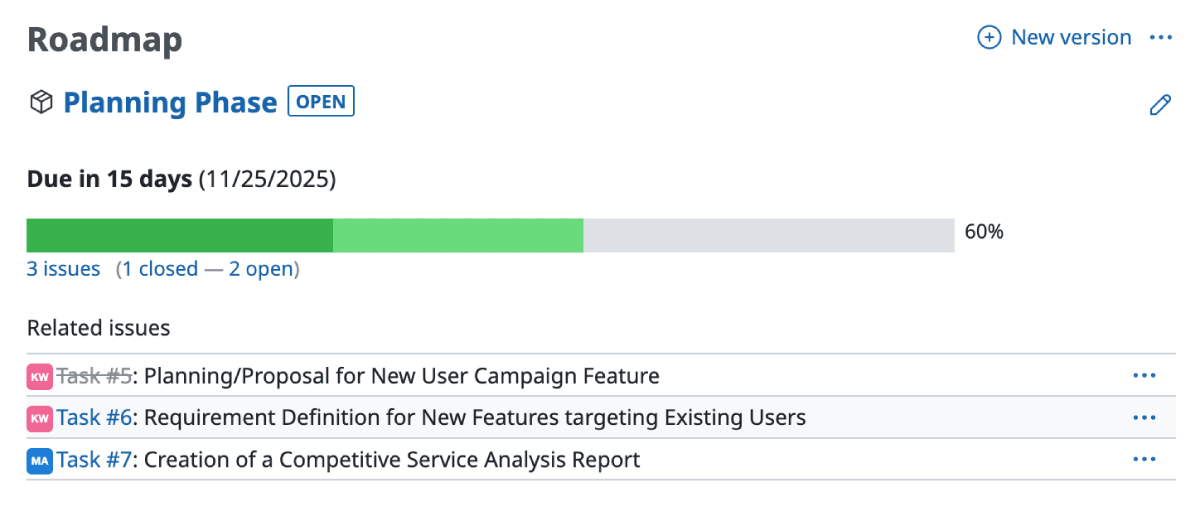
Redmine 7.0
Issue page
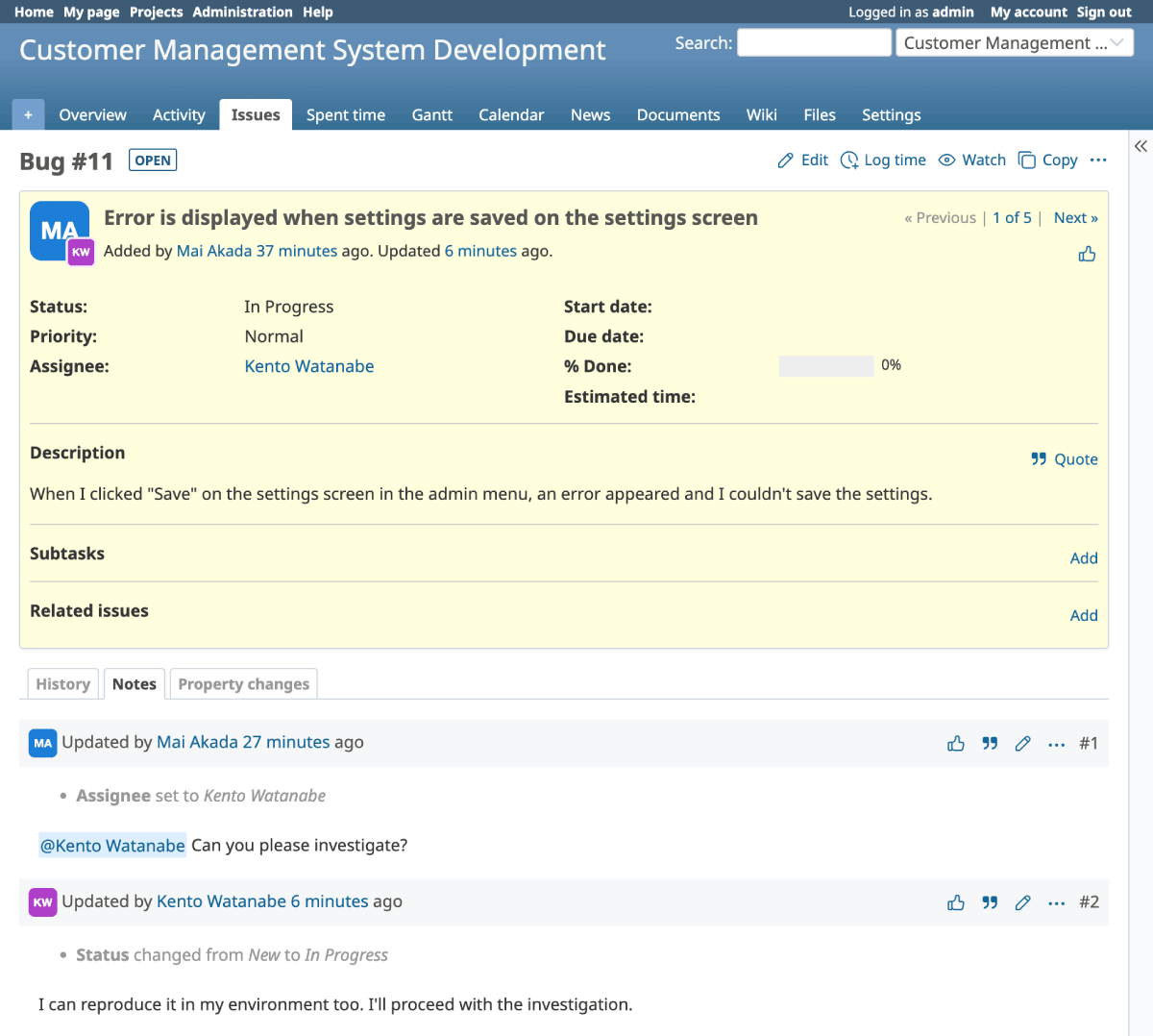
Redmine 6.1
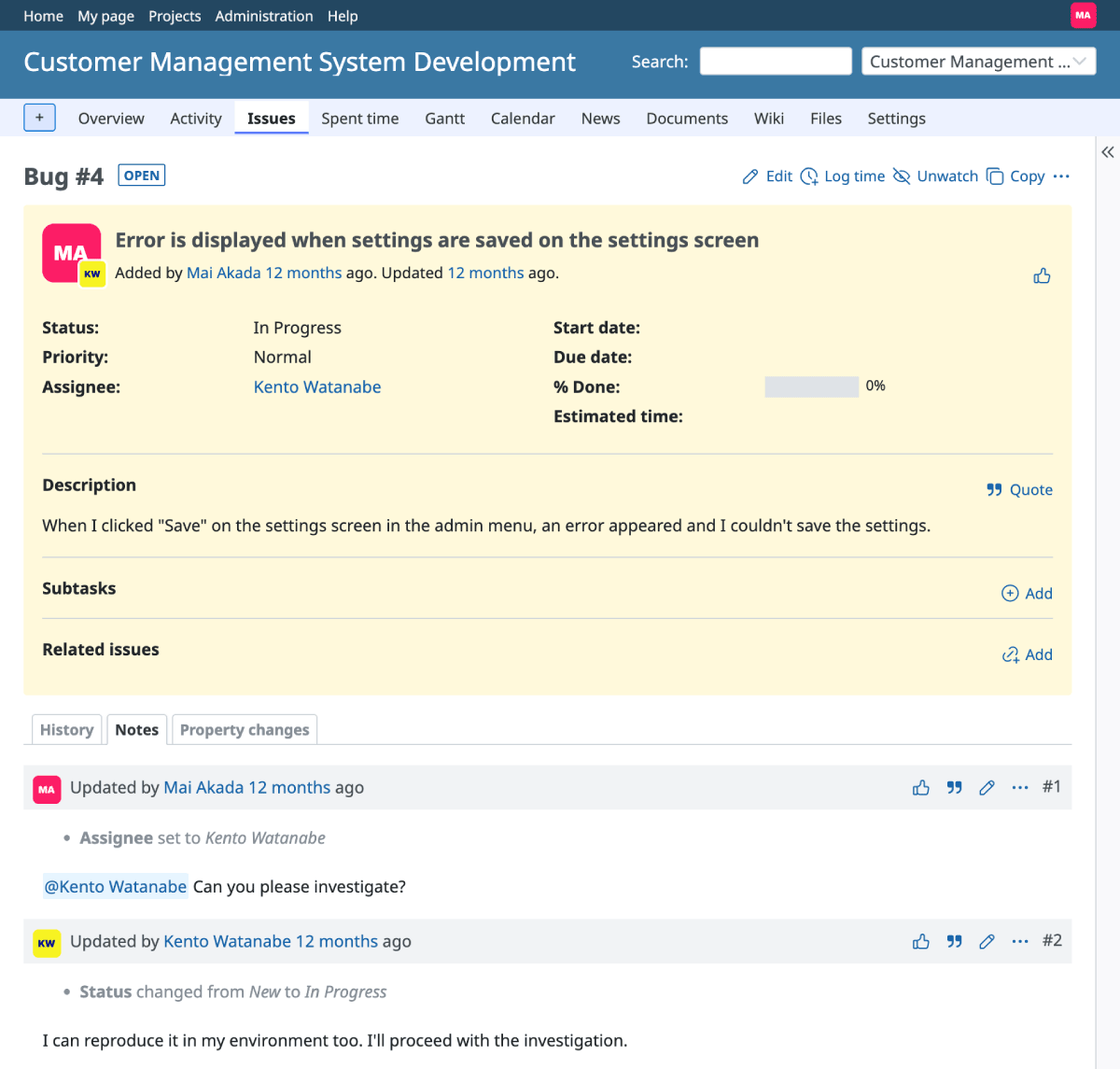
Redmine 7.0
Issues list
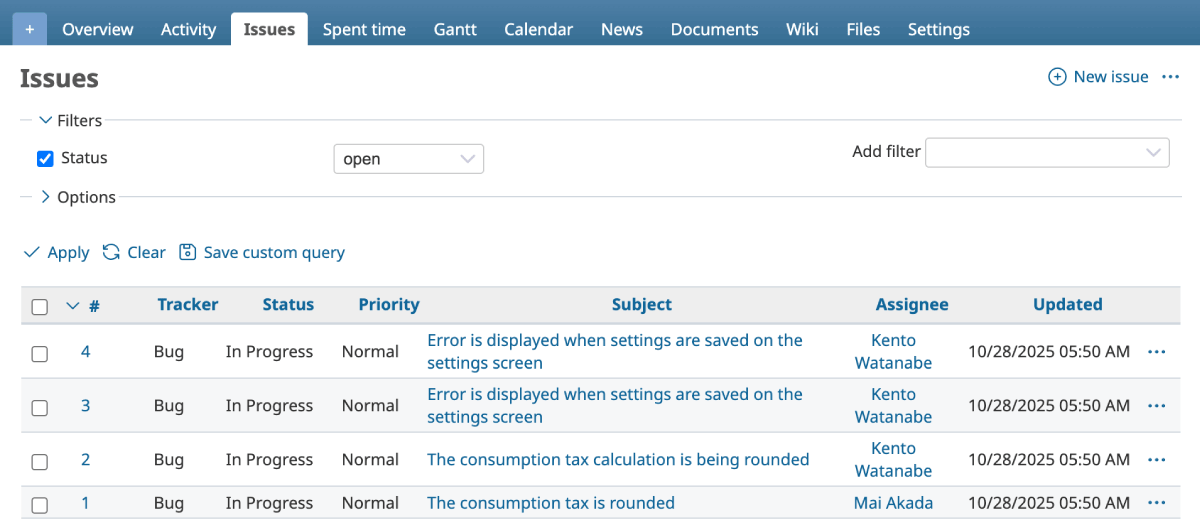
Redmine 6.1
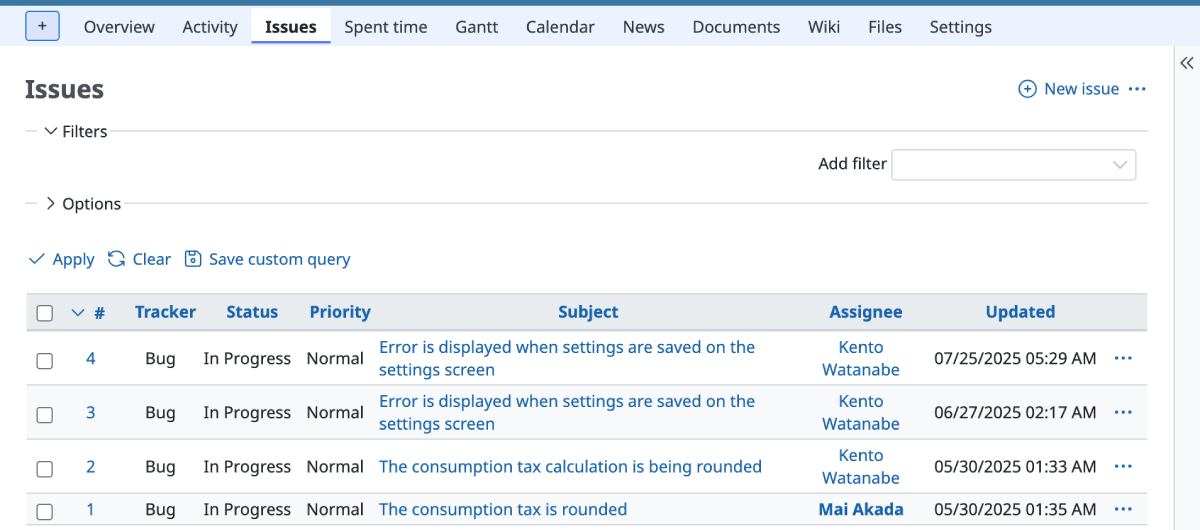
Redmine 7.0
- Official site issue: Feature #43256: Introduce Open Color to unify and standardize CSS colors
Simplify Fieldset Borders in Issue Edit Form
The borders separating sections in the issue editing form have been simplified. Specifically, Redmine retains only the top border and removes the right, bottom, and left borders. Removing these borders reduces unnecessary visual noise, making the entire form cleaner and easier to read.
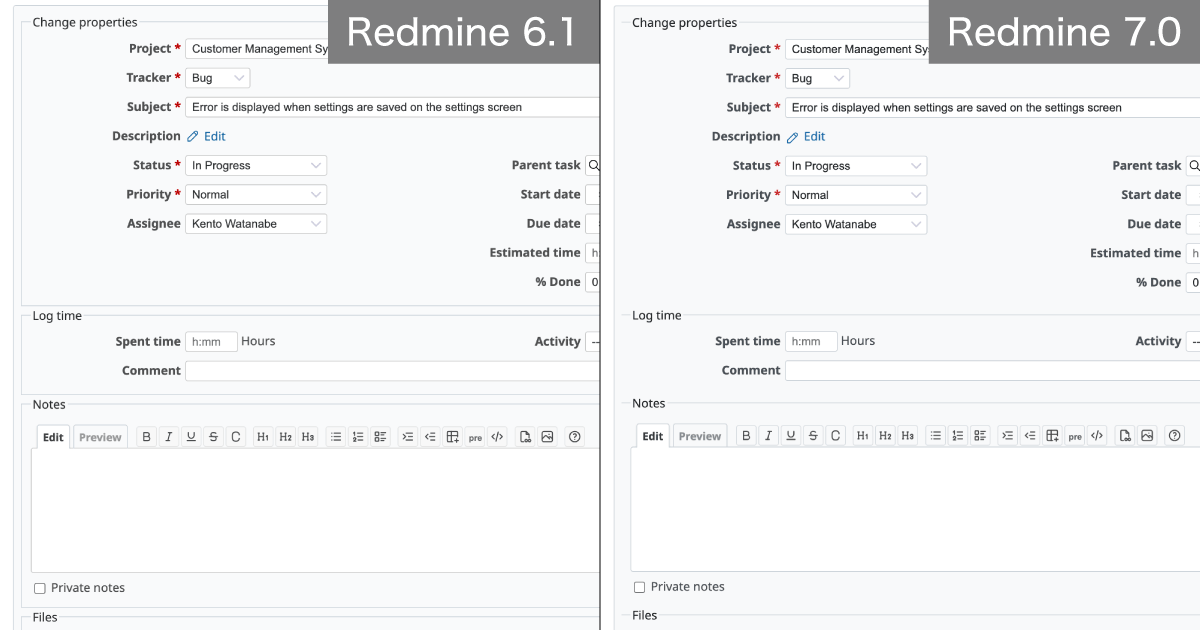
- Official site issue: Feature #43279: Simplify fieldset borders in issue edit form
Declare Text Direction on HTML Element for Better RTL/LTR Styling Support
This adds a function to set the dir attribute (e.g., <html dir="rtl">) on the HTML element according to the current language direction (RTL or LTR), making it easier to write direction-aware CSS.
- Official site issue: Feature #43506: Declare text direction on HTML element for better RTL/LTR styling support
UI Improvements for a Simpler Design (Borders and Padding)
By reducing borders and shadows while increasing white space, text readability has been improved, giving the UI a more spacious and clean feel.


- Official site issue: Feature #43575: Clean up box-like UI elements by adjusting borders and padding
Improved Layout Spacing
Increased top padding between the menu and the title relieves the "cramped" feel and improves visual clarity.

- Official site issue: Feature #43563: Increase top padding of div#content to improve visual spacing and readability
New Default Gravatar Option "Color"
A new option "Color" has been added to the default Gravatar user icon settings.
Compared to traditional options like Identicons or Monster ids, this new "Color" option offers a clean, solid-fill design. By removing unnecessary decorative elements, it allows users to be identified instantly via intuitive color coding. This flat design provides a modern and streamlined look for issue history and activity streams.
How to Configure: Go to Administration → Settings → Display tab, and select "Color" from the "Default Gravatar image" dropdown menu.


- Official site issue: Feature #43658: Add "Color" to the list of default gratavar options
Integrating rtl.css into application.css using CSS Logical Properties
Previously, RTL support was handled by overwriting the standard LTR (Left-to-Right) design in application.css with a separate rtl.css file. This "brute-force" approach often led to layout regressions whenever the main design was updated but the RTL file was not.
By completely deprecating rtl.css and adopting CSS Logical Properties within application.css, fixed directions like "left" and "right" have been replaced with logical terms like "start" and "end." This allows a single CSS file to automatically apply the correct design for both LTR and RTL environments. This change ensures more stable UI quality and faster delivery of new features to RTL users without additional coding overhead.
- Official site issue: Feature #43515: Improve RTL layouts by removing rtl.css and integrating its overrides into application.css using CSS logical properties
Replacing Physical CSS Properties with Logical Properties in Core CSS
Recommended
Many physical properties like margin-left or left remained in Redmine's core CSS for historical reasons. These required manual overrides for RTL environments, which were prone to errors and caused layout issues.
These have been unified into "logical" properties that are independent of reading direction—for example, changing margin-left to margin-inline-start and left to inset-inline-start. By eliminating the concepts of "left" and "right" from the code and letting the system determine the direction, the risk of layout regressions in future updates is significantly reduced.
- Official site issue: Feature #43700: Improve RTL layout support by replacing physical CSS properties with logical ones in core CSS files
Change "Delete" to "Remove" for Non-destructive Actions
Recommended
The labels for actions that do not result in actual data deletion have been changed from "Delete" to "Remove" to avoid confusion.
By changing the label to "Remove" and the icon from a trash can to a broken chain link, it is now clear that only the association is being broken, and the data itself remains in the database.
Specific situations where this change applies include: - Removing a user from a project - Removing a member from a group - Removing a watcher from an issue - Unlinking a related issue - Unlinking a parent or child issue
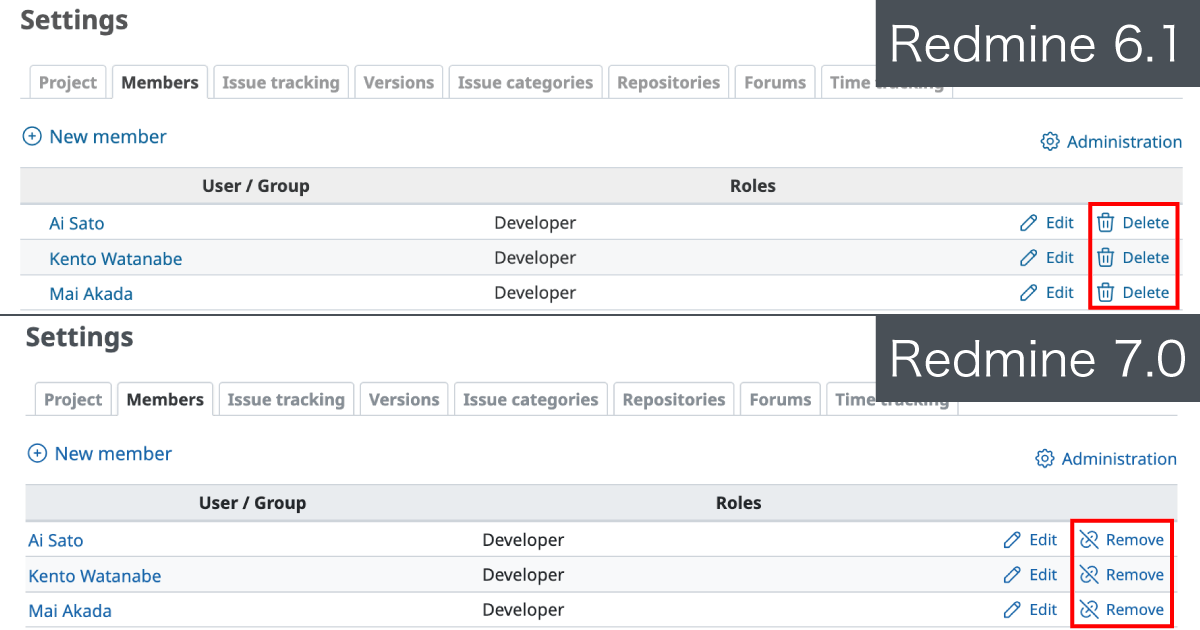
- Official site issue: Feature #34917: Use "Remove" instead of "Delete" for non-destructive unlink/removal action labels
File-type Icons in Attachment Lists
Attachment lists now display specific icons based on the file type, such as PDF, Image, Audio, Video, or ZIP.
Previously, all attachments were represented by a generic paperclip icon. With these new file-type-specific icons, users can identify the nature of each attachment at a glance, making it easier to find the desired information within a long list of files. This also includes support for additional MIME types (#43805).

- Official site issue: Feature #43797: Show file-type icons instead of paperclip icons in attachment lists, Feature #43805: Update file-type icons for additional MIME types
Redesigned Header with a Navigation Bar
Recommended
The header design of the default theme has been redesigned. The main menu, which was previously integrated into the blue header area, has been separated into its own navigation bar with a distinct background color. This reduces visual clutter and provides a cleaner, more modern look.
Additionally, user links in the top menu are now combined into a single user dropdown menu (#31353).
Issue list screen
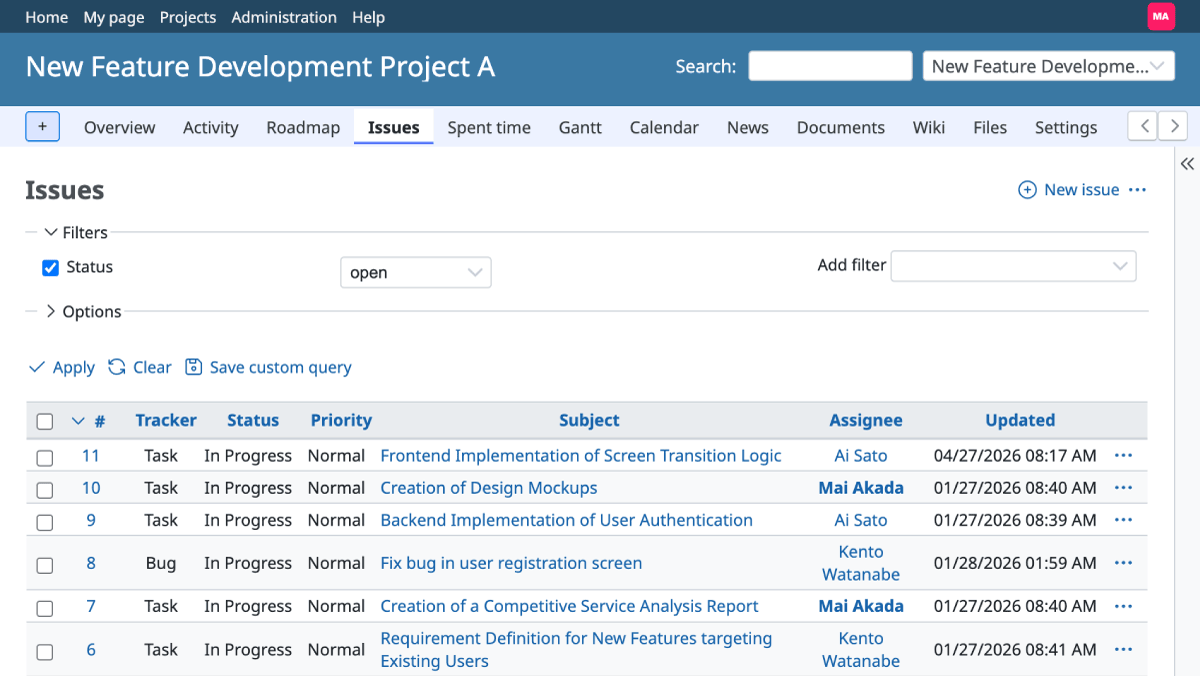
Redmine 7.0
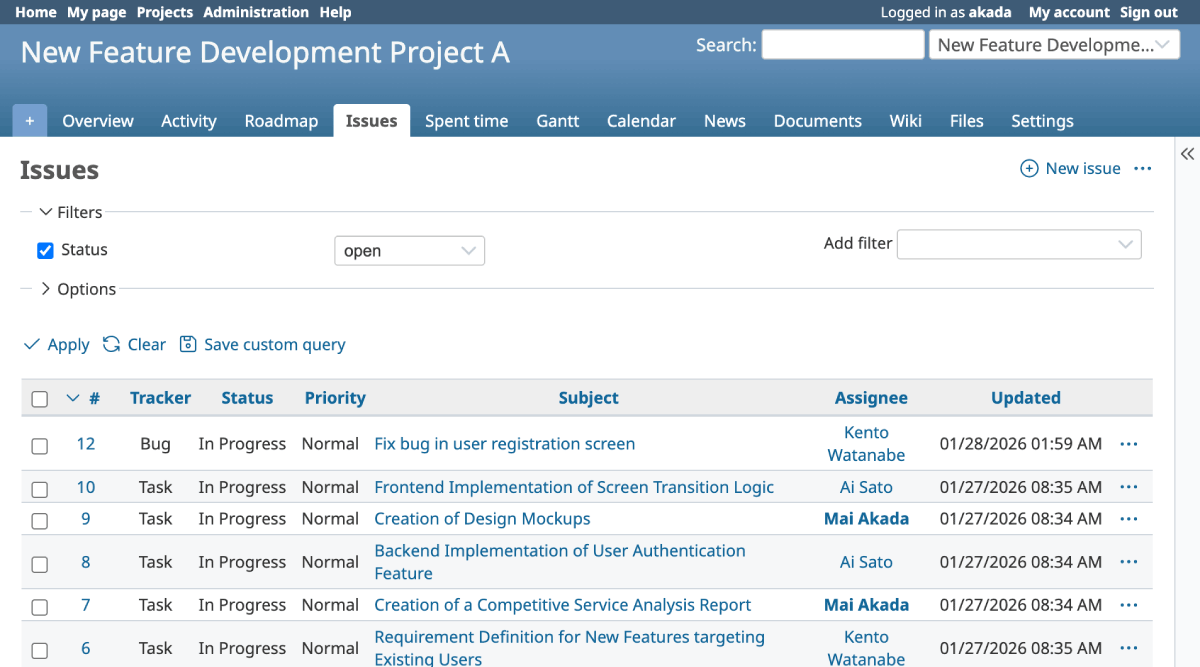
Redmine 6.1
Administration -> Settings screen
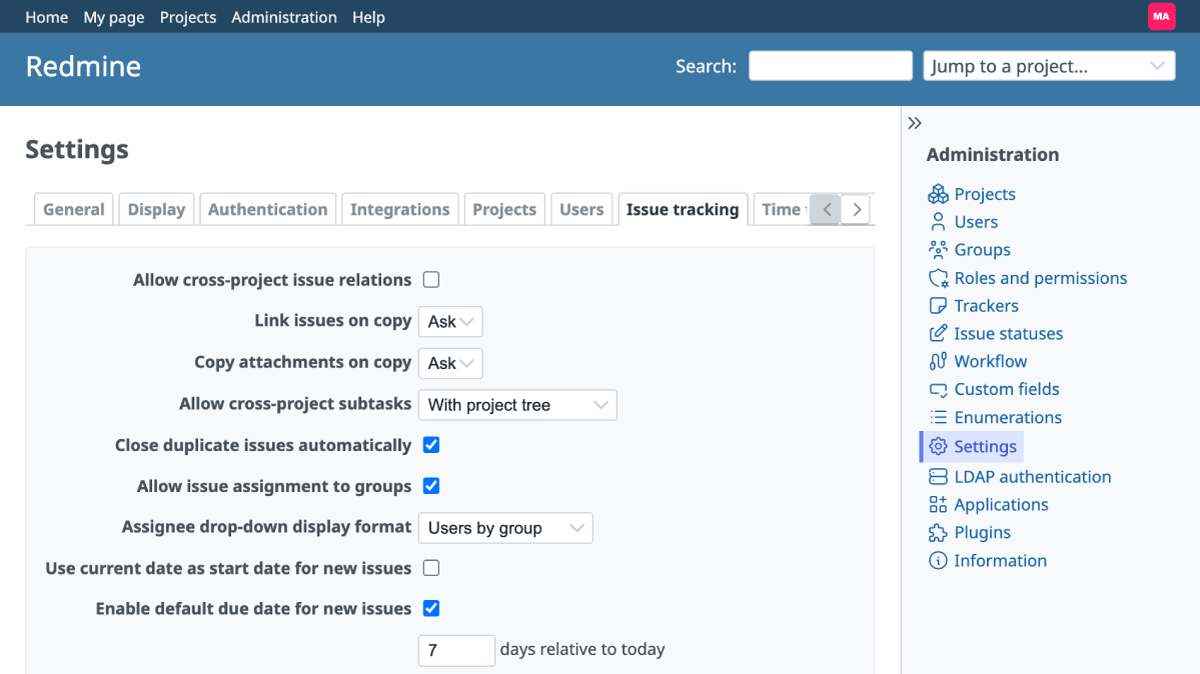
Redmine 7.0
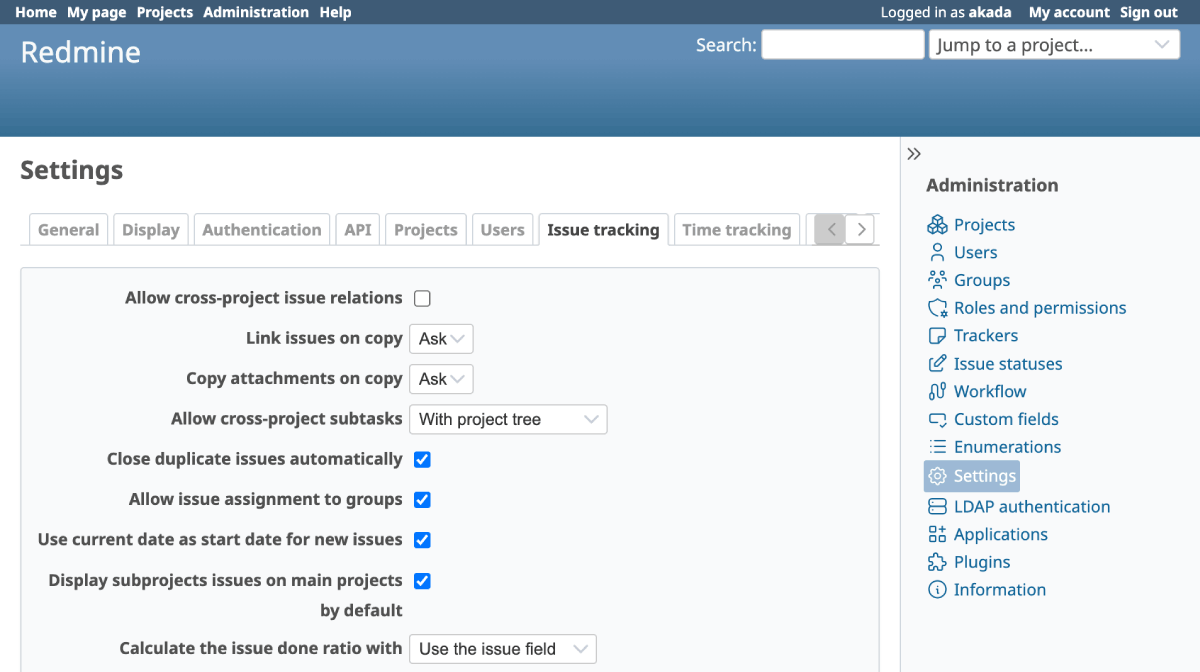
Redmine 6.1
- Official site issue: Feature #43937: Redesign the header with a navigation bar and less weight
Webhooks
Standard Webhooks Support
Recommended
Standard Webhooks support has been added to Redmine core. This allows real-time notifications to be sent to external services when specific events occur in Redmine.
Supported events include issue creation/updates, news postings, time entries, and Wiki page updates. While this functionality previously required third-party plugins, it is now available as a built-in feature, simplifying integration with other tools like Slack, Microsoft Teams, or custom automation scripts.

- Official site issue: Feature #29664: Webhook triggers in Redmine
Wiki
Export All Wiki Pages as a ZIP Archive
Recommended
Users can now export all Wiki pages within a project at once as a ZIP archive containing individual text files. This is convenient when you want to bulk-edit Wiki content in an external editor or use it for analysis and summarization by generative AI.
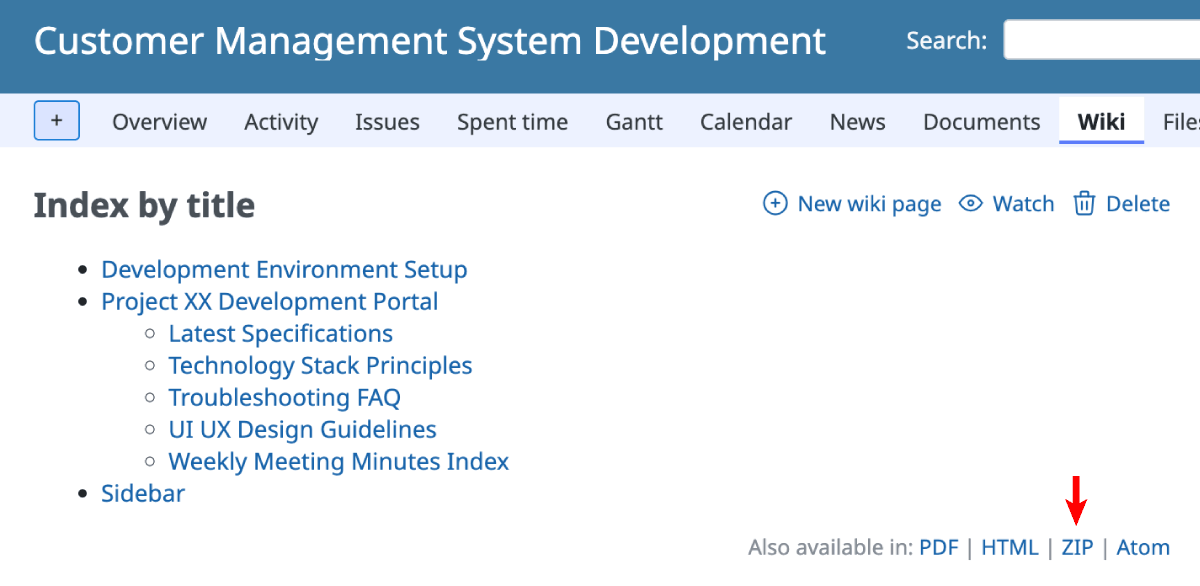
Can be exported using the "ZIP" link at the bottom of the Wiki page
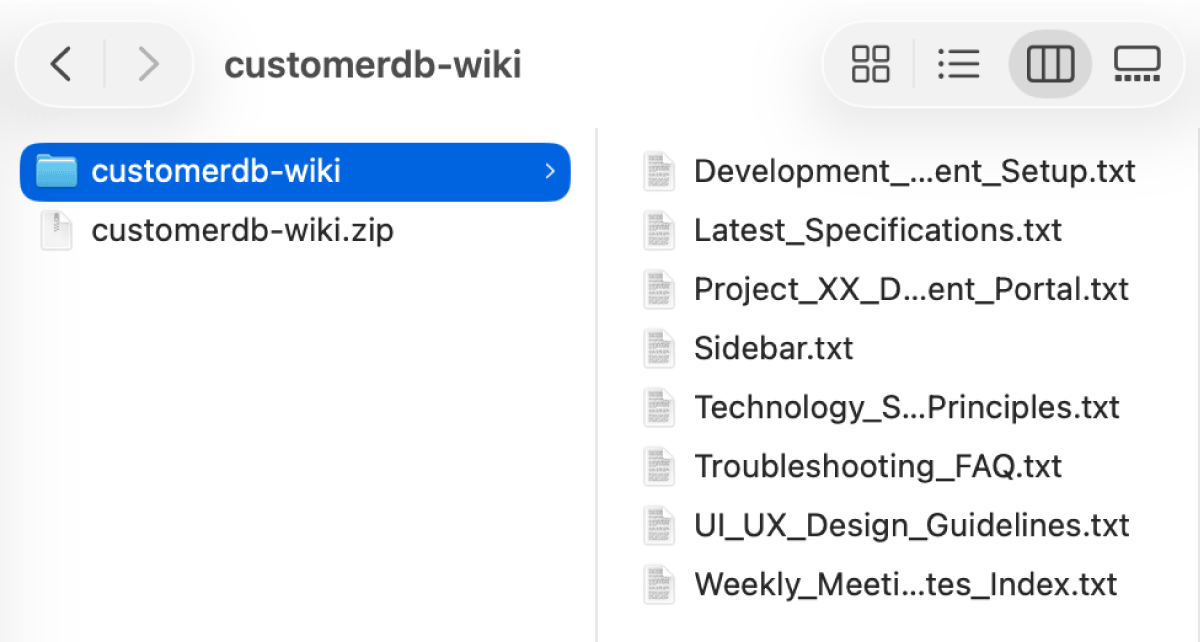
The structure of the exported ZIP file
- Official site issue: Feature #43978: Export all Wiki pages as ZIP archive











