Make the issue author the default assignee when creating a new issue in Redmine
Updated on 2026-02-19
•
Created on 2009-02-10
•

When you create a new issue, Redmine has no feature that displays the page with the author of the issue automatically selected as the assignee.
However, the following web page introduces a way to do this with the View Customize plugin.
Display the user who is creating the issue in "Assignee" on the new issue page (GitHub) (in Japanese)
The View Customize plugin is a plugin that lets you customize the pages of Redmine by embedding any CSS or JavaScript.
A customization made with the View Customize plugin may stop displaying correctly after a version upgrade of Redmine.
For how to set the user who is set as the assignee by default when a new issue is created with no assignee selected, please see Set a default assignee for Redmine issues.
Settings
- Install the plugin by following the installation instructions in the documentation on the official site of the View Customize plugin
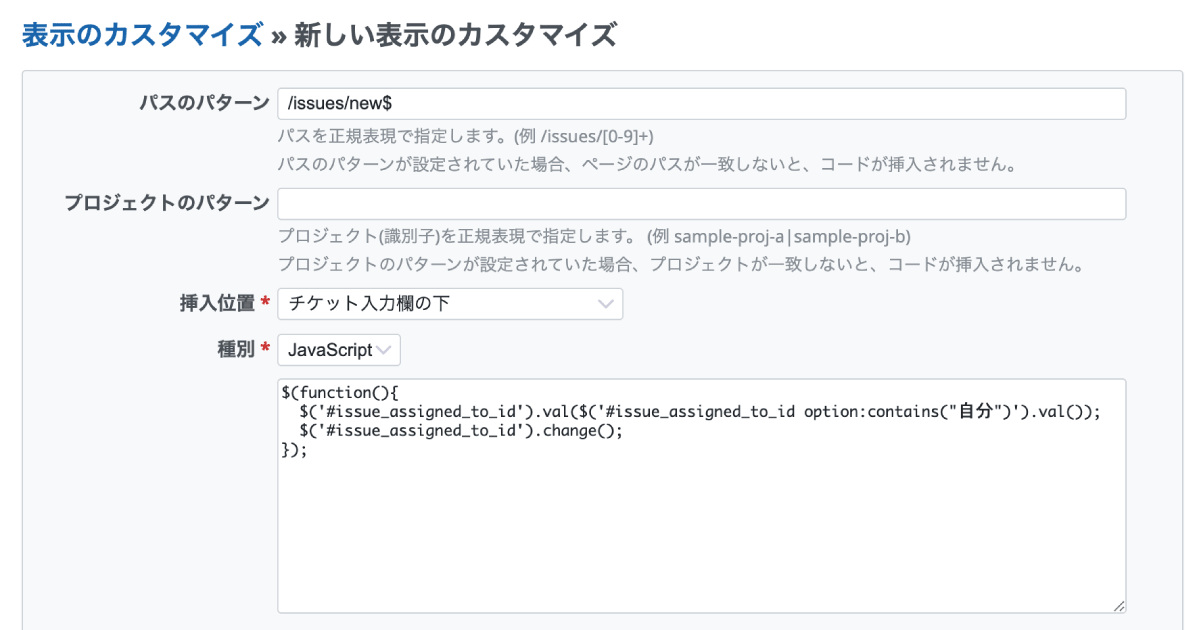
- Click "Administration" → "View customize" → "New view customize"
- On the New view customize page, enter the settings described in Display the user who is creating the issue in "Assignee" on the new issue page (in Japanese)
- Click "Create"
Reference information
These are materials by the author of the plugin that introduce the plugin.
- Making full use of the View customize plugin (in Japanese)
- What you can do with the View Customize Plugin (in Japanese)











