Change the subject and description of a Redmine issue
Created on 2009-09-25
•

This article was written for versions older than Redmine 1.4 (released in 2012).
For how to update the description of an issue in the current Redmine, please see the following article.
Change the Description field of an issue in Redmine
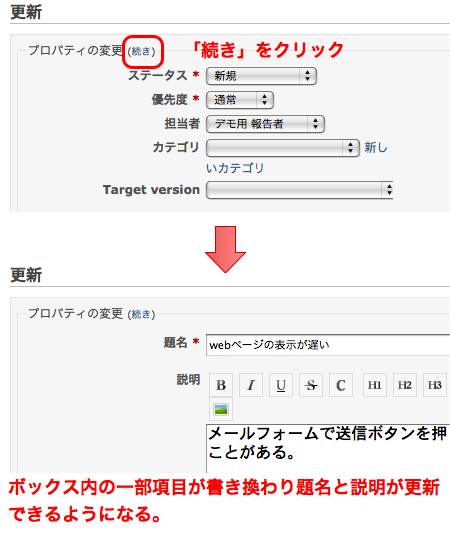
To change the subject and description of an issue, click the "(More)" link on the right of "Change properties" on the issue update page. Some of the fields in the box change, and you can enter the subject, the description and other fields.
To change these fields, you need the "Edit issues" permission. By default, this permission is given to the "Manager" role and the "Developer" role.
Related items











