Change the columns shown in the "Related issues" and "Subtasks" lists on the Redmine issue page
Created on 2025-06-27
•

(Supported versions: Redmine 6.1 or later / RedMica 3.2 or later)
You can customize the fields shown in the Subtasks and Related issues sections of an issue to suit how you operate Redmine. You can set them in "Related and sub issues list defaults" on the "Administration" → "Settings" → "Issue tracking" tab.
You can also display the table headers by selecting "Show table headers".
After the change

Before the change

How to change
- Go to the "Administration" → "Settings" → "Issue tracking" tab
- In "Related and sub issues list defaults", select the columns that you want to display and move them from "Available Columns" to "Selected Columns"
- Click "Save"
The settings apply to all users and all projects.
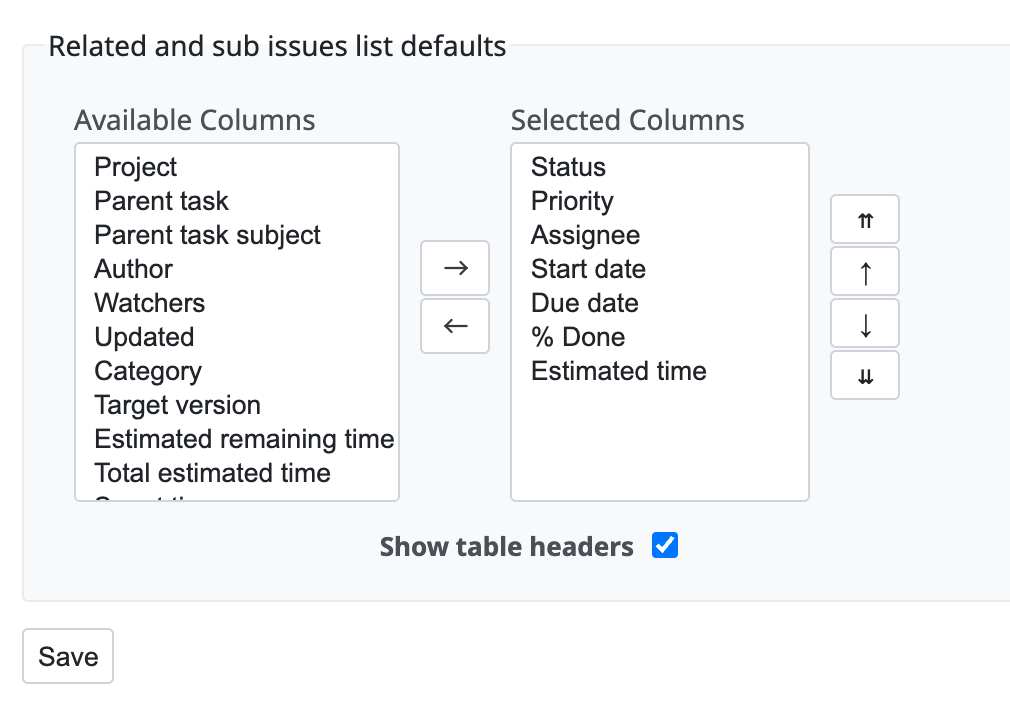
You can turn the "Show table headers" checkbox on or off
Related information











