Allowing only logged-in users to view information in Redmine
Updated on 2021-05-27
•
Created on 2010-12-28
•

To allow only logged-in users to view the information in Redmine, make the following settings.
- Require authentication
- Make projects private
With the default settings of Redmine, anyone can view the content of issues and the Wiki in a public project without logging in. In addition, a newly created project is public by default. As a result, in a Redmine that is operated with the default settings, anyone can view the information of all projects.
This is not a problem when you handle information that is meant to be public, such as an open source project. However, in most cases you want to show information only to a limited set of users.
Settings to change
Require authentication
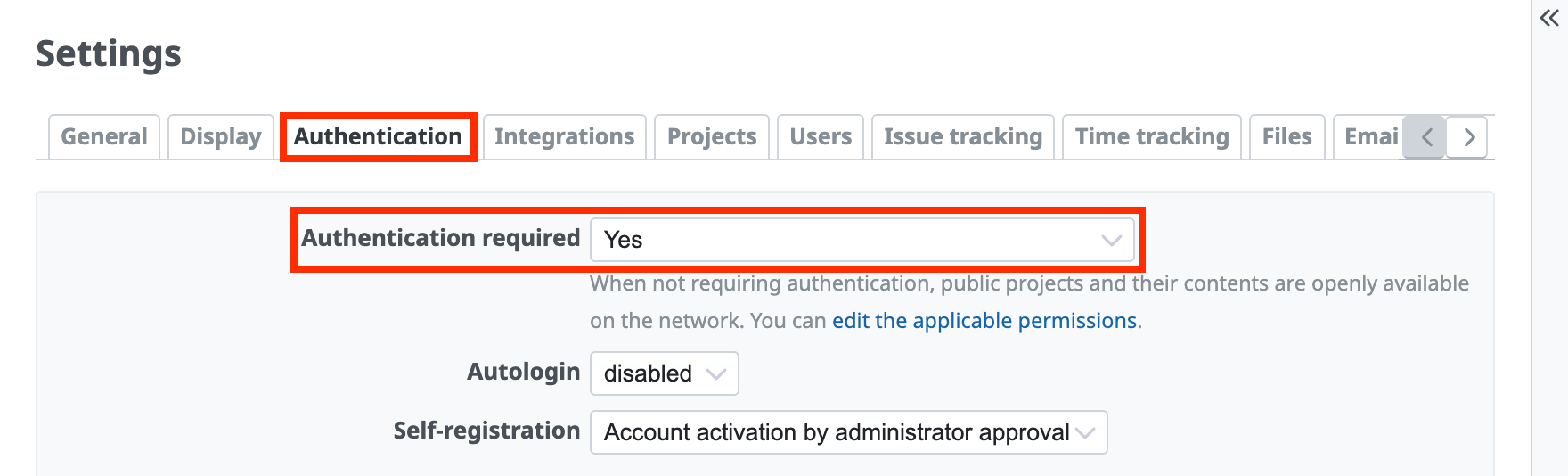
Open the "Authentication" tab of the "Administration" → "Settings" screen, change "Authentication required" to Yes, and click "Save".
(In Redmine 3.4 and earlier, check the "Authentication required" checkbox.)
Redmine then always requires authentication. Users who are not logged in cannot access any information in Redmine.
Make existing projects private
Open the "Settings" screen of the project, clear the "Public" checkbox on the "Project" tab, and click "Save".
(In Redmine 3.4 and earlier, you can set this on the "Information" tab of the "Settings" screen.)
When you make a project private, only the users who are members of the project can view its information. Even if you set "Authentication required" to No by mistake, unauthenticated users cannot see that the project exists. This makes your Redmine safer.
Make new projects private by default
Configure Redmine to create new projects as private projects.
Open the "Projects" tab of the "Administration" → "Settings" screen, clear the "New projects are public by default" checkbox, and click "Save".
Related information











