Associating revisions with Redmine issues without referencing keywords (such as refs)
Created on 2012-10-23
•

When Redmine works together with a version control system, it can associate issues with revisions (links in both directions). To do this, write an issue number with a special keyword in the commit log. The following is an example.
Fix garbled characters in the subject refs #1234
By default, you write the issue number after one of the keywords refs, references, or IssueID. If you change a setting, Redmine can also associate a revision with an issue when you write only the issue number, as follows.
Fix garbled characters in the subject #1234
Fix garbled characters in the subject (#1234)
How to change the setting
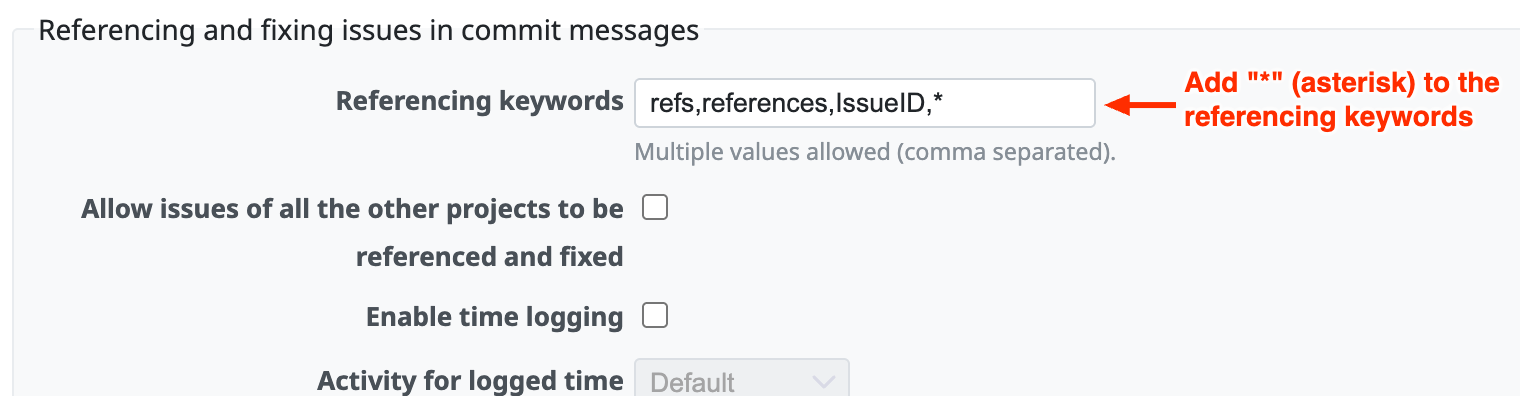
As an administrator, open "Administration" → "Settings" → "Repositories" and add * (asterisk) to "Referencing keywords".
Related information
- r918 (redmine.org)
The Redmine revision that added this feature (November 2007)











