Only up to 500 issues are output when exporting Redmine issues in CSV or PDF format
Updated on 2026-09-14
•
Created on 2012-04-17
•

You can export Redmine issues in CSV or PDF format by clicking a link in "Also available in:" at the bottom right of the issue list page. However, with the default settings, only up to 500 issues are output.
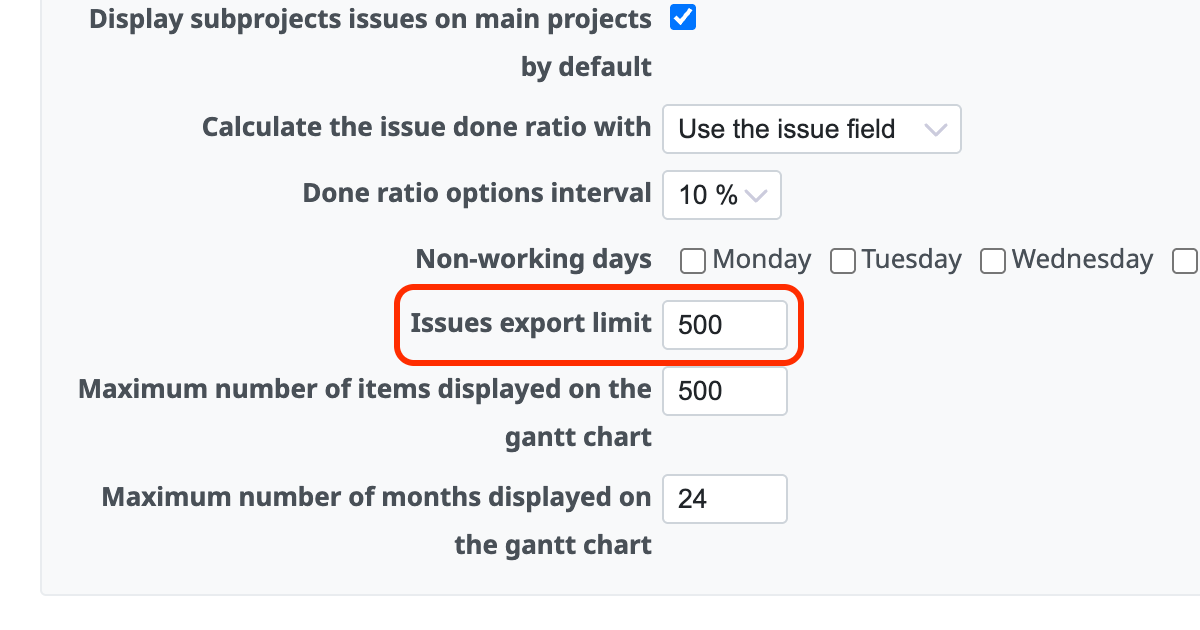
To raise the limit, change the setting called "Issues export limit".
How to change the setting
- As a user with Redmine administrator privileges, open the "Issue tracking" tab on the "Administration" → "Settings" page.
- Change the value of "Issues export limit" to a larger number and click the "Save" button.
Notes
Do not raise the limit more than necessary.
If you increase the value of "Issues export limit", an export of many issues takes a long time, and the export may fail because of a timeout. The load on the server also increases, and this may affect the operations of other users.
When you export a large number of issues, please also consider dividing the issues with filters and exporting them in several parts.
Related information











