Monthly Update: Preview of the New Features in Pre-release Redmine! Sudo Mode Enabled by Default and More (May 2026 Commit Highlights)
2026-06-19
•
Tags: new-feature-before-release, 7.0
•

I introduce the new features that have been committed in the official Redmine repository and will be included in the upcoming release. Let's preview the upcoming features that will make Redmine even more useful.
This month, I'll highlight 5 issues out of the 22 committed in May 2026.
- Sudo Mode Enabled by Default
- Support for Time Format (e.g., "0:45") in Estimated Hours and Spent Time Filters
- Default Value for Private Issue Flag per Tracker
- Links to Group Management from Project Settings > Members Tab
- Adding and Removing Multiple Users to Groups from the Users List
What is Redmine?
Redmine is an open source project management software. It can be freely installed on self-hosted servers or used via cloud services. For more information about Redmine, visit the official site.
Sudo Mode Enabled by Default
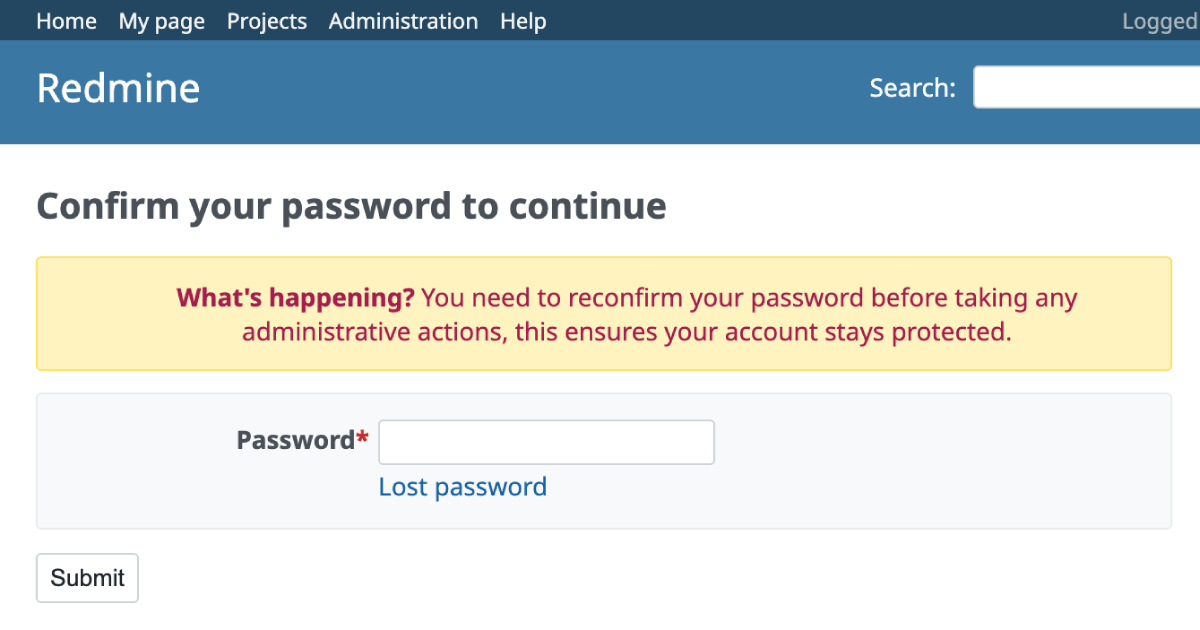
The "sudo mode" feature, which prompts users to re-enter their password when performing critical security operations (such as accessing "Administration" -> "Settings"), will be enabled by default. This helps prevent security incidents where a third party might unauthorizedly alter configurations.
In previous versions, enabling sudo mode required configuring sudo_mode: true in the configuration file config/configuration.yml. Starting with Redmine 7.0, it is enabled by default, ensuring a secure environment even if administrators are unaware of this setting.
If you wish to disable this feature, you can do so by setting sudo_mode: false in the configuration file.
- Expected version: Redmine 7.0.0
- Official site issue: Feature #44052: Enable sudo mode by default
Support for Time Format (e.g., "0:45") in Estimated Hours and Spent Time Filters
When specifying estimated hours or spent time in the issue list filter, you will be able to input time values directly in the HH:MM format, such as "0:45" or "1:30".
In previous versions, even if the display settings were configured to show time format, users had to input hours in decimal format (e.g., "0.75" for 45 minutes, "1.5" for 1 hour 30 minutes) when filtering issues. This improvement aligns the filter input with the display format, making searching for issues by estimated hours or spent time more intuitive and effortless.
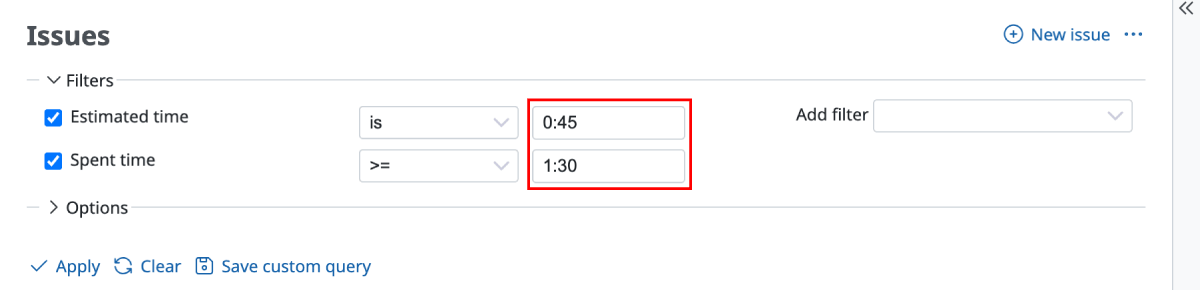
Redmine 7.0
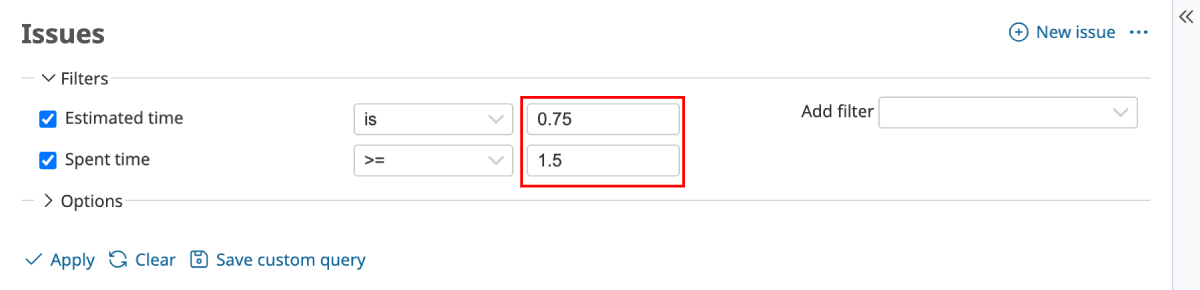
Redmine 6.1
- Expected version: Redmine 7.0.0
- Official site issue: Feature #43968: Allow 0:45h time span format input in the estimated_hours and spent_time filter of IssueQuery
Default Value for Private Issue Flag per Tracker
A new option, "Private by default" will be added to the tracker settings. When this option is enabled, the "Private" checkbox will be pre-selected when creating a new issue using that tracker.

For projects where issues under specific trackers (e.g., "Internal Tasks" or "Security") should always be private, this option prevents information leakage caused by forgetting to check the private flag.

- Expected version: Redmine 7.0.0
- Official site issue: Feature #9432: Default value for the private issue flag
Links to Group Management from Project Settings > Members Tab
A direct link to the group editing/management screen ("Administration" -> "Groups" -> edit page of the specific group) will be added to the group names listed in the project's "Settings" -> "Members" tab.
Previously, when modifying member lists or changing configurations of a group that is registered as a project member, administrators had to leave the project settings, navigate to the "Administration" menu, and open "Groups". With this link, the workflow for project administrators is streamlined, making group maintenance much easier.

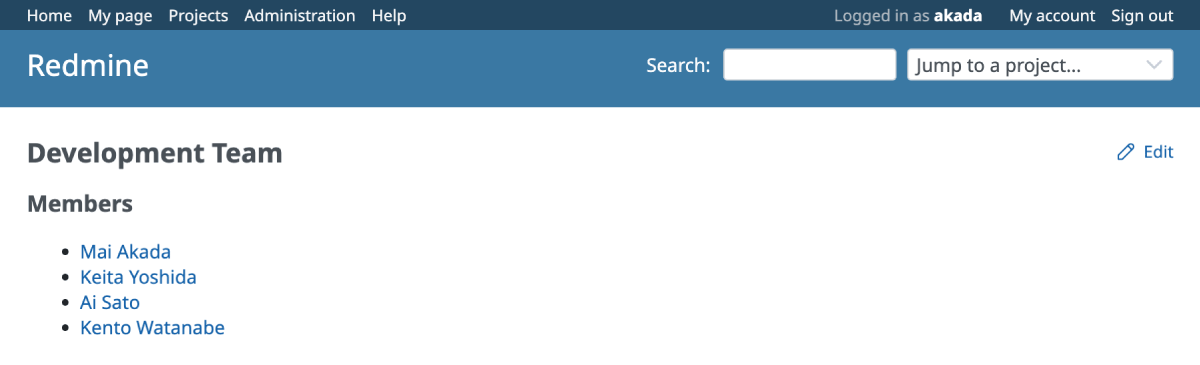
You can edit the group directly by clicking the "Edit" link at the top-right after clicking the group name.
- Expected version: Redmine 7.0.0
- Official site issue: Feature #44013: Add links to groups in the project Settings > Members tab
Adding and Removing Multiple Users to Groups from the Users List
You will be able to add and remove multiple users to/from groups at once directly from the users list screen.
In previous versions, while you could add multiple users to a group from "Administration" -> "Groups" or project's "Settings" -> "Members" tab, removing users from a group required clicking the "Remove" link one by one.
With this improvement, you can select multiple users on the "Administration" -> "Users" screen and use the context menu to add or remove them. This also allows you to select multiple users and remove them from groups at once, improving efficiency.

- Expected version: Redmine 7.0.0
- Official site issue: Patch #43640: Improve Group Controller – Enable Adding/Removing Multiple Users from Users View
Get Early Access to New Redmine Features with RedMica
"RedMica" is yet another version of Redmine provided by Far End Technologies. It quickly integrates the latest Redmine features, allowing you to use these new features ahead of others.

My Redmine: Use RedMica Right Away
My Redmine offers RedMica, a version of Redmine provided by Far End Technologies. It allows My Redmine customers to experience new features before the release of the next version of Redmine.
My Redmine Global Edition website: https://www.redminecloud.net/
My Redmine Global Edition Free Trial: https://free-trial.redminecloud.net/